



- The Universal AI Context Problem: You're Losing 15-30 Minutes Every Switch
- Why Professionals Use Different AI Platforms
- AI Memory Export: Platform Comparison 2025
- Step-by-Step Guide: Switching Between AI Tools with Context
- AI Context Flow vs Manual Context Management: Which Should You Choose?
- AI Context Switching Calculator (Interactive Tool)
- Take Control of Your AI’s Memory When You Switch AI Next Time
- Additional Resources
- Frequently Asked Questions (FAQ) about Universal AI Context
Universal AI Context: How to Switch AI Platforms - Between ChatGPT, Claude & Gemini Without Losing Memory
By Hira • Dec 15, 2025

The Universal AI Context Problem: You're Losing 15-30 Minutes Every Switch
💡 What is Universal AI Context?
Universal AI context is a portable memory layer that maintains your conversation history, project details, and preferences across multiple AI platforms like ChatGPT, Claude, and Gemini, eliminating the need to rebuild context when switching tools.
Switching between ChatGPT, Claude & Gemini, but you keep losing context?
Universal AI context lets you maintain memory across ChatGPT, Claude, Gemini, and other AI platforms. Without it, you must rebuild context each time you switch tools, costing professionals 200+ hours annually. Now you can switch AI tools without worrying about retyping the entire context.
Don’t want to manually transfer context? AI Context Flow automatically maintains universal AI context across ChatGPT, Claude, Gemini, and all major AI platforms.
✅ 2-minute setup | ✅ Works with all AI tools | ✅ Free Chrome extension
Why AI Memory Management Matters in 2025
Professional AI usage has exploded:
- 84% of developers use AI tools in their workflow (Stack Overflow 2025)
- 51% use AI daily for development tasks
- 56% of all U.S. employees now use generative AI for work
- Average professional uses 3-5 different AI platforms weekly
The problem: Multi-platform AI usage is now standard, but AI memory doesn’t transfer between platforms.
What You Lose When You Switch AI Tools Without Context
The context for AI doesn’t transfer between platforms. When you switch from ChatGPT to Claude to Gemini:
| What You Lose | Impact |
|---|---|
| Conversation history | Must re-explain everything |
| Project specifications | Inconsistent recommendations |
| Personal preferences | Generic, off-brand outputs |
| Previous decisions | Repeated mistakes |
| Time | 15–30 minutes lost per switch |
What Exactly Does AI Context Contain?
We are talking about AI context and memory loss again and again. But what exactly does it contain? Specific context includes:
- Conversation history: Previous questions and answers
- Project details: Specifications, requirements, constraints
- Personal preferences: Tone, style, output format
- Domain knowledge: Industry terminology, company-specific info
- Long-term memory: Persistent facts the AI should never forget
The Real Cost of Context Loss During AI Interactions
When you switch from one AI platform to another without transferring context, you suffer:
- Time Waste: Repeating project background and requirements
- Inconsistency: Different AI tools make conflicting recommendations
- Cognitive Load: Remembering which AI knows what
- Quality Degradation: Outputs lacking full context produce inferior results
- Productivity Drain: 27% of frequent AI users save over 6 hours per week, but only if context is maintained
Three Solutions to Maintain Universal AI Context When You Switch AI
This guide covers three proven methods to keep your context for AI portable:
- Manual context transfer (free, 10-minute setup)
- Platform-native features (Claude’s import/export)
- Universal context tools (AI Context Flow – automated solution)
Calculate how much time you can save with AI Context Flow
Why Professionals Use Different AI Platforms
| Reason | Description | Percentage of Users |
|---|---|---|
| Specialized Capabilities | Different models excel at different tasks | 67% |
| Cost Optimization | Free tiers and pricing differences | 54% |
| Performance Variance | One model may handle coding better, another writing | 61% |
| Feature Availability | Specific features only on certain platforms | 48% |
| Rate Limits | Switching when hitting usage caps | 43% |
| Experimentation | Testing which AI works best for specific tasks | 52% |
Real-World Examples
Software Developer:
- Morning: Claude (architecture planning)
- Afternoon: GitHub Copilot (coding)
- Evening: ChatGPT (documentation)
Without AI memory: Each tool starts from scratch, unaware of your codebase or decisions.
Content Creator:
- Research: ChatGPT (web search)
- Writing: Claude (larger context window)
- Editing: Gemini (grammar)
Without context management, different AI platforms produce different voices that are unaware of brand guidelines.
The AI Context Switching Tax
Employees using AI report an average 40% productivity boost, but that productivity gain diminishes significantly when context is lost between tools.
Never waste time again in context switching
Switch AI, but why waste your time. Join 1000+ professionals that save time every week with AI Context Flow for resuable AI context across all platforms.
AI Memory Export: Platform Comparison 2025
Which platforms support memory export in 2025? Let’s take a look.
| Platform | Memory Feature | Context Window | Export Support | Import Support | Best Use Case |
|---|---|---|---|---|---|
| ChatGPT | Saved memories + chat history | 128K tokens | ❌ Limited | ❌ No | Personal assistant |
| Claude | Project-based Markdown | 200K tokens | ✅ Full | ✅ Full | Professional workflows |
| Gemini | Temporal annotated | 1M tokens | ⚠️ Limited | ⚠️ Limited | Document processing |
| Grok | Basic persistent | ~128K tokens | ⚠️ Unknown | ⚠️ Unknown | X platform integration |
Platform Comparison Table
ChatGPT Memory (OpenAI)
Memory Type: Dual-system with “saved memories” and “chat history reference.”
Features:
- Automatic memory creation from conversations
- Manual memory entries via direct instruction
- Memory viewing and editing through settings
- Both saved memories you’ve asked it to remember and chat history insights gathered from past chats
Export Capability: ❌ Limited
- No official export API
- Users report requesting verbatim memory output through chat
- Community workarounds exist, but are unsupported
Best For: Long-term personal assistant use, but lacks portability
Claude Memory (Anthropic)
Memory Type: Project-scoped memory stored in Markdown files
Features:
- Project-scoped memory (each project has its own separate memory)
- File-based architecture (CLAUDE.md files)
- Full user control to view and edit
- Incognito chat for conversations that don’t save to memory
Export Capability: ✅ Excellent
- You can export your memory as a backup or bring it to another AI service by copying and pasting it
- Direct import/export between Claude and other platforms
- Import/export feature directly addresses concerns about platform lock-in
Best For: Professional workflows requiring context portability and transparency
Gemini Memory (Google)
Memory Type: Dual system with session-based context and long-term memory
Features:
- Each memory statement is annotated with a rationale pointing back to the source interaction and date
- Massive context window (1 million tokens)
- Integration with Google Workspace
- Temporal grounding (memories include dates)
Export Capability: ⚠️ Limited
- No direct export feature
- Can view conversation history through Google Account settings
- Workspace integration provides some data portability
Best For: Google ecosystem users, extensive document processing
Grok Memory (xAI)
Memory Type: Basic persistent memory
Features:
- Users can see exactly what the AI knows and choose what it should forget
- Transparent memory viewing
- User-controlled deletion
Export Capability: ⚠️ Limited documentation
- New feature with limited public information
- Transparency-focused but export unclear
Best For: Users prioritizing transparency in the X ecosystem
Step-by-Step Guide: Switching Between AI Tools with Context
Any native feature in any of the different types of AI platforms cannot solve the problem of context switching alone. This is because these platforms lock in the AI context of users as it is a competitive moat and retention mechanism. However, we have some workarounds and external tools that solve this.
Method 1: Manual Context Transfer (Universal Approach)
Step 1: Create a Context Document
Before switching AI platforms, compile a master context document with:
markdown
`# Project Context Template
## Project Overview
– Name: [Project Name]
– Objective: [What you’re trying to achieve]
– Timeline: [Deadlines and milestones]
## Key Requirements
– [Requirement 1]
– [Requirement 2]
– [Requirement 3]
## Constraints
– [Technical constraints]
– [Budget/resource constraints]
– [Time constraints]
## Previous Decisions
– [Decision 1 and rationale]
– [Decision 2 and rationale]
## Preferred Approach
– Tone: [Professional/Casual/Technical]
– Format: [Bullet points/Paragraphs/Code-heavy]
– Style: [Concise/Detailed/Step-by-step]
## Current Status
– What’s been completed: [List]
– What’s in progress: [List]
– Next steps: [List]`
Time Investment: 10-15 minutes initially
Time Saved: 5-10 minutes per subsequent switch
Step 2: Export from Source Platform
For ChatGPT:
- Ask ChatGPT: “Write out your memories of me verbatim, exactly as they appear in your memory.”
- Copy the output to a text file
- Save locally or in cloud storage
For Claude:
- Go to Settings > Features > “View and edit memory.”
- Click export or ask in chat: “Write out your memories of me verbatim.”
- Copy the Markdown output
- Save as
claude-memory-export.md
For Gemini:
- Limited direct export; use conversation history
- Navigate to myactivity.google.com
- Filter by “Gemini Apps Activity”
- Review and compile relevant information manually
Step 3: Prepare for Import to Target Platform
Importing to ChatGPT:
Prompt: “I’m bringing over context from another AI assistant. Please remember the following about me and my current project:
[Paste your context document here]
Please confirm you understand this context and will apply it in our conversation.”
Importing to Claude:
- Copy and paste the memory text into a new chat
- Use prompt: “Please add the following to your memory of me: [paste context].”
- Alternatively, use Settings > Features > “View and edit memory” to manually add
Importing to Gemini:
Prompt: “I need you to remember the following context for our work together:
[Paste your context document here]
Please reference this information throughout our conversation.”
Step 4: Verify Context Transfer
After importing, test with questions that require the transferred context:
Test Prompt: “Based on what you know about my current project, what would be the next logical step?”
The AI should reference specific details from your imported context.
Method 2: Claude's Native Import/Export (Recommended)
Claude supports importing memories from other AI assistants by copying and pasting
Exporting from Claude:
- Settings > Features > “View and edit memory.”
- Copy all memory content
- Save as a Markdown file for backup
Importing to Claude:
- Open a new chat or project
- Paste the memory content with the instruction: “Please incorporate this as your memory.”
- Claude may not always successfully incorporate imported memories, as this is experimental
Pro Tip: Claude’s memory focuses on work-related topics, so it may not retain imported personal details unrelated to work
Method 3: AI Context Flow (Automated)
Best for: Power users, multi-platform professionals
Time: 5 min setup, then automatic
AI Context Flow (built on Open Context Layer) is a universal context/memory management layer that sits between you and your AI tools, automatically maintaining context across all platforms.
Automate your context switching!
AI Context Flow automatically maintains AI memory across ChatGPT, Claude, Gemini, and all major platforms.
How AI Context Flow Works
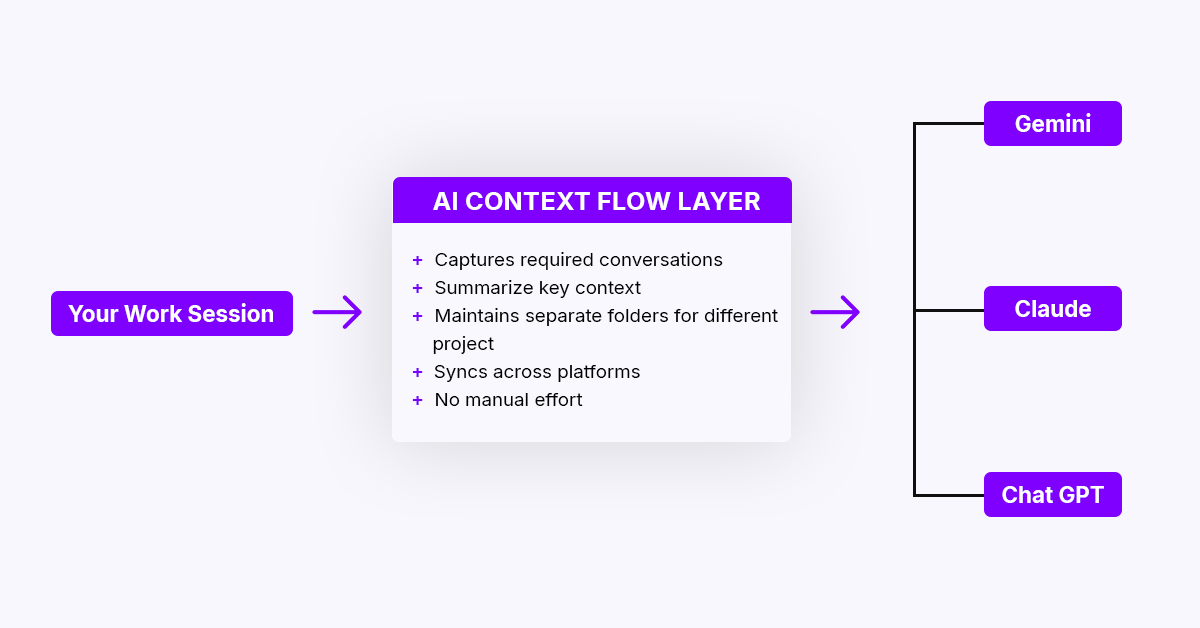
AI Context Flow universal memory layer diagram showing context sync across ChatGPT, Claude, and Gemini platforms
How AI Context Flow works:
1. Automatic Capture
- Auto-saves conversations into project folders
- Extracts key decisions and tags them
- Documents failed approaches
- No manual work required
2. Intelligent Selection
- AI determines relevant context for each conversation
- Prevents context overload and hallucinations
- Prioritizes recent, critical information
- Filters noise automatically
3. Universal Format
- Works with all major AI platforms
- Automatic platform-specific translation
- No vendor lock-in
- Future-proof
4. User Control
- Edit or delete outdated context
- Collect context from files, web, or chats
- Branch for experiments
- Merge project phases
AI Context Flow vs Manual Context Management: Which Should You Choose?
| Factor | Manual Transfer | Claude Native | AI Context Flow |
|---|---|---|---|
| Setup time | 10–15 min per project | 5 min per project | 2 minutes one-time |
| Time per switch | 15–30 minutes | 5–10 minutes | < 30 seconds |
| Platforms supported | All (manual work) | Claude only | All major AI tools |
| Accuracy | Prone to copy errors | Good | 100% automated |
| Context freshness | Manual updates needed | Manual updates needed | Real-time automatic |
| Maintenance burden | High (weekly updates) | Medium | None (automatic) |
| Learning curve | Medium (templates) | Low | None |
| Best for | Occasional users | Claude-only users | Multi-platform power users |
| Cost | Free (your time) | Free | Free tier + paid plans |
When to Use Each Method
Use Manual Transfer if:
- You switch AI platforms less than once per week
- You only work on 1-2 projects at a time
- You prefer complete manual control
Use Claude Native Features if:
- You primarily use Claude for all AI tasks
- You occasionally need to export context elsewhere
- You want transparency in what’s stored
Use AI Context Flow if:
- You use 3+ AI platforms regularly
- You switch between AI tools 3+ times per day
- You manage multiple projects simultaneously
- You want to save 200+ hours annually
Bottom line: Manual methods work for light users, but AI Context Flow saves 15-20 hours per month for professionals using multiple AI tools daily.
AI Context Switching Calculator (Interactive Tool)
Use this interactive calculator to estimate how much time you could save with proper context management:
Calculate how much time you can save with AI Context Flow
Take Control of Your AI’s Memory When You Switch AI Next Time
The multi-AI future is here, and it’s not going away. With 56% of U.S. employees already using generative AI tools for work and that number growing, learning to manage context across platforms isn’t optional; instead, it’s essential.
The professionals who thrive in this environment aren’t those who stick to one AI tool. They’re the ones who strategically leverage multiple platforms while maintaining consistent, portable context.
Key Takeaways
- Context loss is expensive: You’re losing 15-30 minutes every time you switch platforms without proper context management
- Not all platforms are equal: different agents are better for different tasks, and not all platforms allow the import/export of context. Claude currently offers the best export/import capabilities for professional use
- Manual methods work: Even simple context documents save significant time
- Universal context layers are emerging: Tools like AI Context Flow represent the future of seamless multi-platform AI use
- Regular maintenance is crucial: Weekly context updates and monthly audits keep your AI assistants effective
Your Next Steps
- Audit your current AI usage: Track which platforms you use and how often you switch
- Calculate your potential savings: Use the time calculator above to quantify the impact of creating a reusable context
- Create your universal context: Download AI Context Flow and start organizing your projects through the memory studio
- Set up a context management routine: Monthly audits to maintain AI Context hygiene and freshness of context
The goal isn’t to use fewer AI tools: it’s to use them more intelligently. With proper context management, you can leverage the unique strengths of each platform while maintaining the continuity that makes AI truly productive.
Frequently Asked Questions (FAQ) about Universal AI Context
What is a universal AI context?
Universal AI context is a portable memory layer that preserves your conversation history, project details, and preferences across multiple AI platforms like ChatGPT, Claude, and Gemini, eliminating the need to rebuild context when you switch AI tools.
How do I keep AI context when switching between ChatGPT and Claude?
You can maintain AI context across platforms by: (1) manually exporting and importing context documents, (2) using Claude’s native import/export feature, or (3) installing AI Context Flow, which automatically syncs context across all AI tools.
How much time does universal AI context save?
Professionals save 15-30 minutes per AI tool switch. With an average of 5 switches per day, universal AI context management saves 200+ hours annually.
Which AI platforms support context export?
Claude offers the best context export/import capabilities. ChatGPT allows limited memory export through chat requests. Gemini has limited export features through conversation history.
Is AI Context Flow free of cost?
There is a free tier available. For higher limits, there is a price. See our pricing page for more details.
Can I use the same context across all AI platforms?
Yes, but with considerations. Basic project context (goals, requirements, preferences) transfers well across all platforms. However, platform-specific features (like code execution in Claude or Google Workspace integration in Gemini) may require tailored context additions.
How often should I update my universal context document?
For active projects, update weekly. Make significant decisions or changes immediately. For long-running projects, comprehensive monthly reviews keep context current and prevent the accumulation of outdated information.
Which AI platform has the best context management?
Claude currently offers the most user-friendly export/import capabilities. Claude includes an import/export feature that directly addresses platform lock-in concerns. However, the “best” platform depends on your specific workflow and ecosystem (Google Workspace users may prefer Gemini).
Can I automate context transfer between AI platforms?
Not officially through native features, but third-party tools and browser extensions are emerging. AI Context Flow represents the next generation of universal context management, automating much of the manual work.
How much context is too much context?
Focus on relevant, current information. General guideline: 500-1000 words of core context, plus project-specific details as needed. If you use AI Context Flow, it will automatically bring in the required minimal context without bloat.
What happens to my context if an AI platform shuts down?
This highlights the importance of maintaining your own context backups. Claude’s export feature ensures data remains portable and prevents vendor lock-in. Regular exports to local storage protect against platform changes.
Can I share context with team members?
Yes, but methods vary. Claude’s project-based approach works well for teams. For other platforms, share your context document via your team’s collaboration tools (Notion, Confluence, Google Docs). AI Context Flow will soon support team features as well (last updated: Dec 2025; please check the website for current updates).
How do I handle conflicting information from different AI platforms?
Maintain a single source of truth in your universal context document. When AIs provide conflicting advice, document the contradiction, correct the research, and update your master context accordingly.