



- What Happens When You Switch Between Gemini and ChatGPT
- Why Switching Between Gemini and ChatGPT Feels Like Groundhog Day
- How Gemini and ChatGPT Handle Memory Differently
- Three Ways to Preserve Your AI Chat History
- Why Unified AI Memory Changes Everything
- Your Next Step: Stop Starting Over
- Key Takeaways
How to Switch Between Gemini AI and ChatGPT Without Losing Your Chat History
By Hira • Jan 5, 2026

What Happens When You Switch Between ChatGPT and Gemini
You open Gemini, spend 10 minutes explaining your project details, get exactly the output you need. Then you remember ChatGPT handles your specific task better. You switch platforms and… start from scratch. Again. 🤯
Every time you move between these AI platforms, you’re forced to rebuild everything: project context, preferences, background information, writing style. It’s like explaining your work to a new colleague who never talks to the previous one.
The numbers tell the real story: professionals using multiple AI tools waste 5 hours weekly just repeating information they’ve already provided. That’s over 200 hours annually spent on redundant explanations instead of actual work.
Try out this calculator to see how much time you are wasting when switching between different AI agents and rebuilding context.
Here’s the frustrating part – this happens because Gemini and ChatGPT store your conversations in completely isolated systems. Your carefully built context in one platform doesn’t transfer to the other. You’re essentially maintaining separate relationships with each AI, and switching between them feels like losing all the personalization you’ve built up.
Whether you’re comparing Gemini’s real-time information with ChatGPT’s creative capabilities, or trying to use each platform for its specific strengths, the context problem remains: your valuable conversation history gets trapped in platform silos.
But there’s a better way. You don’t have to choose between platforms or continue this wasteful cycle. This guide shows you practical methods to maintain your conversation history when switching between Gemini and ChatGPT, so you can use the best AI for each task without starting over every time.
Why Switching Between Gemini and ChatGPT Feels Like Groundhog Day
The frustration isn’t in your head. There are real technical reasons why moving between these platforms feels like explaining yourself to someone with short-term memory loss.
The Context Repetition Trap
Every platform switch forces you to rebuild your entire conversational foundation. Think about what disappears when you move from one AI to another:
- Your project’s technical requirements and constraints
- File uploads and document references
- Preferred communication style and output format
- Previous decisions and the reasoning behind them
- Domain-specific knowledge you’ve already established
Sarah, a marketing consultant, switches between platforms 5 times daily. She spends 25-50 minutes just repeating context that should already exist. Over a week, that’s 6.5 hours of pure administrative overhead.
How Each Platform Handles Your Conversations Differently
Here’s where things get technical. Each AI stores and retrieves your information using fundamentally different approaches:
ChatGPT treats your memory like a messy notebook. Information gets stored as a flat, unorganized list where different projects bleed into each other. Upload a document? You’ll need to re-upload it next session. No organizational structure, no file persistence.
Gemini takes a different approach entirely. It automatically connects to your Google ecosystem – Gmail, Drive, Calendar, Photos. This integration feels magical for Google users, but that context stays locked in Google’s universe.
Claude organizes everything into Projects with dedicated instructions and file storage (up to 200MB per project). Clean, organized, but completely isolated from other platforms.
Why Your Carefully Built AI Context Vanishes
The fundamental issue isn’t technical limitations – it’s business strategy. Each platform uses memory as a retention tool. Your conversations become valuable data that keeps you locked to their ecosystem.
When you’ve spent weeks training ChatGPT to understand your writing style, switching to Gemini feels like starting over with a complete stranger. That’s not an accident – it’s the point.
This creates an impossible choice: use the best AI for each specific task, or maintain the context that makes AI actually useful. Most people choose consistency over capability, limiting their productivity.
Fortunately, tools like AI Context Flow break this lock-in by creating a universal memory layer that travels with you across all platforms.
How Gemini and ChatGPT Handle Memory Differently
The memory systems behind these platforms work in fundamentally different ways, which explains why your context vanishes when you switch tools. Let’s break down how each platform stores and recalls your information.
What is Gemini Memory and How It Works
Gemini takes a unique approach by automatically integrating with your Google Workspace. Without any manual setup, it pulls context directly from your entire Google ecosystem:
- Work role and company details from Gmail signatures
- Project information from Google Drive documents
- Meeting contexts from Calendar events
- Communication patterns and preferences
This integration makes Gemini particularly powerful if you’re already embedded in the Google ecosystem. The AI builds a contextual understanding of your digital world through these connections, creating surprisingly accurate personalization.
The catch? This memory stays locked within Google’s platform. All that rich context disappears the moment you switch to ChatGPT or Claude.
ChatGPT Memory: Strengths and Limitations
ChatGPT’s approach is simpler but comes with significant trade-offs. The platform stores information as a flat, unorganized list that accumulates from your conversations.
This creates what’s known as the “memory bleed problem” – different projects and contexts get jumbled together without clear separation. You can’t attach files that act as memories either, so you’re constantly re-uploading documents for personalization.
ChatGPT also provides no organizational structure for memories. You can’t export, back up, or port these memories to other tools. Once you’ve built up context in ChatGPT, you’re essentially locked into that platform if you want to maintain that personalization.
The Key Differences That Matter
Here’s how these memory systems stack up:
Organization: Gemini integrates contextually with Google services, while ChatGPT stores everything as an unstructured list.
File Handling: Gemini can reference your Google Drive documents automatically; ChatGPT requires manual re-uploads each session.
Context Sources: Gemini pulls from your entire Google ecosystem; ChatGPT relies solely on previous conversations.
Platform Lock-in: Both systems trap your carefully built context in separate silos, forcing redundant explanations when switching platforms.
The fundamental limitation remains the same across both platforms: AI context isolation. Despite their different approaches, neither system talks to the other. Your carefully built relationship with one AI doesn’t transfer when you switch tools.
Fortunately, tools like AI Context Flow now solve this by creating a universal memory layer that works across multiple platforms, eliminating the need to rebuild context when moving between Gemini and ChatGPT.
Automate your context switching!
AI Context Flow automatically maintains AI memory across ChatGPT, Claude, Gemini, and all major platforms.
Three Ways to Preserve Your AI Chat History
Your AI conversations don’t have to disappear every time you switch platforms. Here are three proven methods to maintain continuity between Gemini and ChatGPT.
Method 1: Manual Export and Import
The basic approach: export from one platform, import to another.
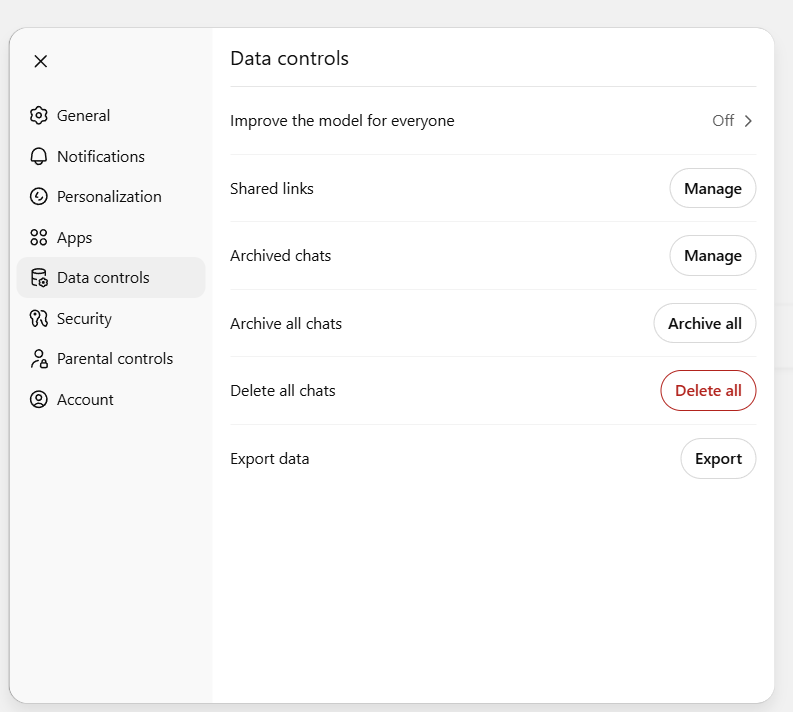
How to Download ChatGPT Chats: Click on your profile icon → settings → Data Controls → Export data. This will give you .zip file download link on your email.
How to Download Gemini Chats: There is no direct way to extract gemini chats. A workareound exists with canvas mode. Select canvas mode and then add this prompt, which will open your conversation in the canvas mode from where you can download the current conversation in pdf. You can also see in this youtube video.
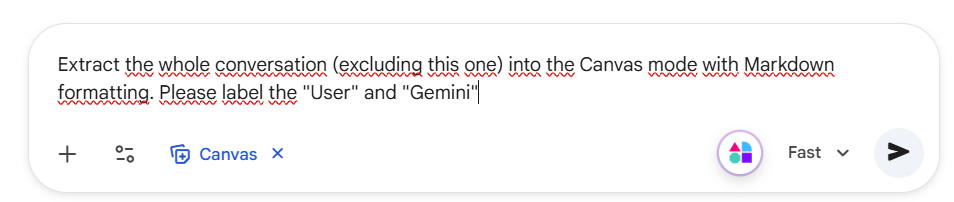
Prompt used: Extract the whole conversation (excluding this one) into the Canvas mode with Markdown formatting. Please label the “User” and “Gemini”
Importing Back: Once the export is done, then you manually import them (upload or copy paste) to the other agent.
The reality? This method works, but it’s tedious. You’ll spend time copying, pasting, and rebuilding context with each switch. Fine for occasional use, not practical for daily workflows.
Method 2: AI Context Flow (Automated Solution)
AI Context Flow creates a universal memory layer that works across multiple AI platforms. This Chrome extension automatically synchronizes your context between Gemini, ChatGPT, Claude, and other AI tools.
Download AI Context Flow to eliminate manual context rebuilding entirely.
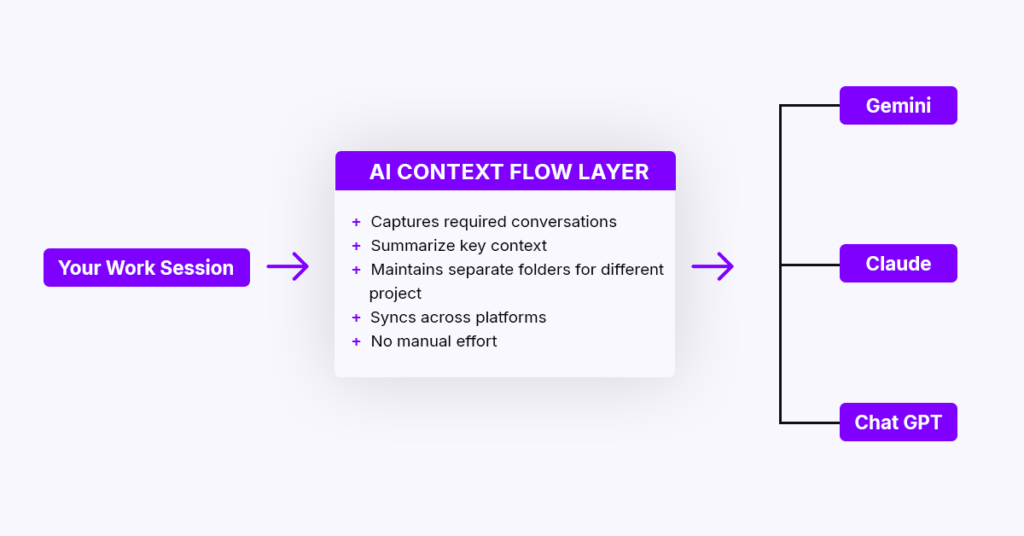
How it works:
- Captures conversation context with 1 click
- Organizes information into project-specific buckets
- Injects relevant context into any AI platform you’re using
- Syncs across all your devices and platforms
Method 3: Memory Buckets for Project Organization
Think of memory buckets as organized folders for your AI context. Within AI Context Flow’s Memory Studio, you can:
- Create topic-specific buckets (Client A, Project X, Personal Writing)
- Upload files in bulk for each project
- Edit and refine individual memories as projects evolve
- Test bucket effectiveness before deploying them
Using Gemini and ChatGPT with Shared Context
Here’s the workflow that saves professionals 5-10 hours weekly:
Step 1: Build your context once in organized memory buckets
Step 2: Switch between AI platforms freely
Step 3: Relevant context gets injected in 1-click
No more explaining the same project details repeatedly. No more lost productivity from context switching.
Want to stop rebuilding context every time you switch platforms? Setup AI Context Flow today and keep your AI conversations connected across all platforms.
Why Unified AI Memory Changes Everything
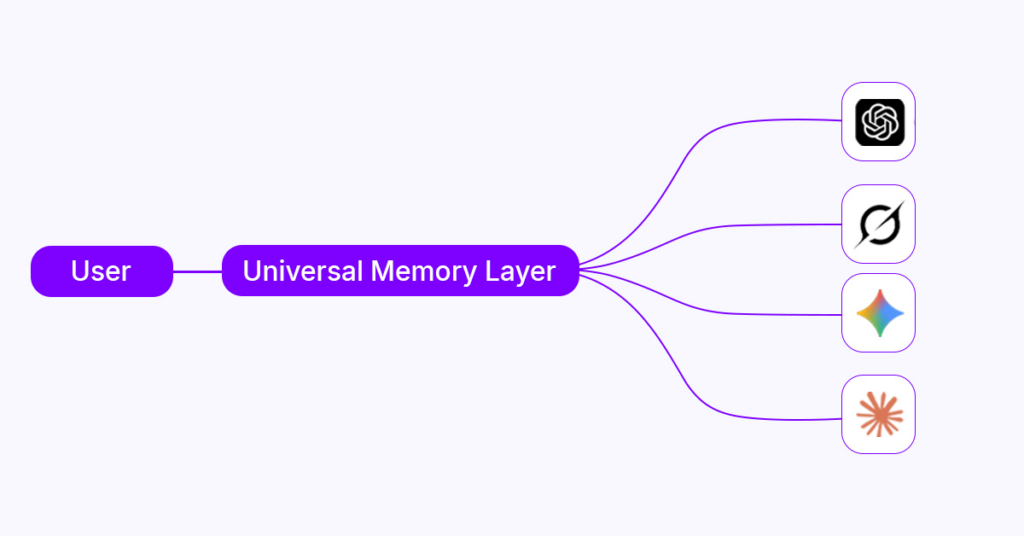
The transformation happens fast. Professionals report dramatic workflow improvements within days of implementing cross-platform memory solutions. Here’s what actually changes when you stop rebuilding context.
Save 5-10 Hours Weekly on AI Context Repetition
Marcus, a content creator, was switching between ChatGPT for ideation, Claude for research, and Gemini for current events. His daily routine looked like this:
- Morning: Explain brand voice to ChatGPT (8 minutes)
- Afternoon: Re-explain project to Claude (12 minutes)
- Evening: Brief Gemini on content strategy (6 minutes)
- Result: 26 minutes wasted daily just on context setup
After implementing unified memory, Marcus cut this to under 2 minutes daily. That’s 2.5 hours saved weekly – time he now spends on actual content creation rather than explaining himself to AI tools.
Keep Your Voice Consistent Across All AI Tools
Before unified memory, Marcus noticed his outputs felt schizophrenic. ChatGPT captured his conversational style perfectly, but Claude sounded formal and corporate. Gemini outputs required heavy editing to match his brand voice.
His solution? A unified “Personal Brand” memory bucket containing:
- Writing style preferences
- Brand guidelines
- Tone examples
- Content frameworks
Results: editing time dropped from 45 to 15 minutes per piece. His audience couldn’t tell which AI platform he’d used because the voice remained consistently his.
Use Each AI for What It Does Best
Sarah, a marketing consultant, discovered the sweet spot: strategic AI selection without context loss.
Her workflow:
- ChatGPT: Creative campaigns and ideation
- Claude: Deep research and analysis
- Gemini: Real-time market data and trends
With client-specific memory buckets, Sarah maintained perfect context continuity while leveraging each platform’s strengths. She saved 8 hours weekly on context management, reduced client revision requests by 40%, and took on two additional clients without increasing work hours.
The math works out: instead of choosing between AI capabilities or context continuity, unified memory gives you both.
Your Next Step: Stop Starting Over
Switching between AI platforms doesn’t have to feel like groundhog day anymore.
You’ve seen how Gemini and ChatGPT handle memory differently, creating those frustrating information silos that eat up your time. The solution isn’t picking one platform and sticking with it – that would mean missing out on each tool’s unique strengths.
The real answer is building your context once and taking it everywhere. With unified memory, you can finally use ChatGPT for creative work, Gemini for real-time information, and Claude for deep analysis without losing the thread of your projects.
Here’s what changes when you stop rebuilding context every time:
Your workflow becomes strategic. Use the best AI for each specific task instead of settling for whatever platform remembers your preferences.
Your outputs stay consistent. No more generic responses because the AI forgot your writing style or project requirements.
Your time becomes yours again. That extra workday you get back each week? You can spend it on actual work instead of explaining the same project details over and over.
The professionals who thrive with AI aren’t the ones who master a single platform. They’re the ones who strategically use multiple tools while maintaining consistent context across all of them.
Ready to stop the cycle? AI Context Flow gives you portable memory that works with every major AI platform. Your conversation history travels with you, your preferences stay consistent, and you finally get to use the best tool for each job without starting from scratch.
Go check it out. 😊
Key Takeaways
Switching between AI platforms doesn’t have to mean losing your conversation history or wasting valuable time rebuilding context from scratch.
• Professionals waste 5-10 hours weekly repeating context when switching between Gemini AI and ChatGPT due to isolated memory systems.
• Each platform handles memory differently: Gemini integrates with Google Workspace while ChatGPT stores flat, unorganized conversation lists.
• AI Context Flow enables cross-platform memory sync, allowing you to maintain consistent context across multiple AI tools without repetition.
• Use the best AI for each task – leverage ChatGPT for creativity, Claude for research, and Gemini for current info without losing context.
• Create organized memory buckets for different projects to instantly inject relevant context into any AI platform you’re using.
The solution is simple: build your context once in organized memory buckets, then seamlessly access it across all your favorite AI platforms. This approach transforms frustrating platform-switching into a smooth, productive workflow that saves hours weekly.
Frequently Asked Questions (FAQs)
How can I maintain my chat history when switching between Gemini AI and ChatGPT?
You can use tools like AI Context Flow, which creates a universal memory layer that works across multiple AI platforms. This allows you to seamlessly synchronize your conversation history between Gemini AI, ChatGPT, and other AI tools without losing context.
Why do I lose my conversation history when switching between AI platforms?
This happens because Gemini AI and ChatGPT have different memory systems. Gemini integrates with Google Workspace, while ChatGPT stores conversations as a flat, unorganized list. These isolated systems don’t communicate with each other, causing you to lose context when switching platforms.
How much time can I save by preserving my chat history across AI platforms?
Professionals report saving 5-10 hours weekly by eliminating the need to repeat context when switching between AI platforms. This can amount to reclaiming nearly a full workday of productivity each week.
Can I use different AI platforms for specific tasks without losing context?
Yes, with a unified memory solution, you can strategically use different AI platforms for their strengths (e.g., ChatGPT for creative tasks, Claude for research, Gemini for current information) while maintaining consistent context across all of them.
How do I create organized memory buckets for different projects?
Using tools like AI Context Flow’s Memory Studio, you can create topic-specific buckets, upload files in bulk, edit individual memories, and test the effectiveness of your memory buckets before using them in your AI interactions.