

Plurality Network

How to Sync Memory Across ChatGPT, Claude, Gemini, Perplexity, Grok, and More

How to Sync Memory Across ChatGPT, Claude, Gemini, Perplexity, Grok, and More

By Hira • Dec 03, 2025

How to Sync Memory Across ChatGPT, Claude, Gemini, Perplexity, Grok, and More

The Multi-Agent Future is Here

Most people start their journey into the AI world by onboarding onto ChatGPT. But soon after, they realize that there is a swarm of AI agents, each specializing in a different set of tasks.

Today, working efficiently means using ChatGPT for creative brainstorming, Claude for complex analysis, Gemini for research, Perplexity for real-time information, and Grok for unfiltered perspectives. But there’s a critical problem: your ChatGPT memory doesn’t talk to your Claude AI memory. Your AI context in Gemini stays locked in Gemini. These tools don’t talk to each other and are operating in silos.

“Every time you switch tools, you’re starting from scratch.”

The AI Context Repetition Tax: The Silent Productivity Killer

Professionals today are commonly using 3-5 different AI tools regularly, e.g., ChatGPT for creative work, Claude for analysis, Gemini for research, Perplexity for citations, and Grok for real-time data.

Each platform requires its own AI context setup, creating what we call the “Context Repetition Tax.”

Using multiple tools isn’t indecision, but rather it’s strategic tool selection for competitive advantage.

“Different AI agents are better for different things, hence professionals use best-of-breed tools for the job.”

But every platform switch forces a choice: start fresh with no context, or spend 5-10 minutes explaining your project background. If you’re switching between three AI agents five times daily, you’re losing 25-50 minutes on AI context repetition, adding up to ~6.5 hours a week. That’s nearly a full workday lost to repetitive admin work, the exact opposite of what AI was supposed to deliver.

How to Sync Memory Across ChatGPT, Claude, Gemini, Perplexity, Grok, and More

AI Context Repetition Tax: The Silent Productivity Killer for Professionals

This fragmentation costs you time, money, and the full potential of these powerful tools. Moreover, an abbreviated AI context means lower-quality outputs that require more revision. Many professionals maintain premium subscriptions across multiple platforms ($60-100 monthly) just to compensate for poor AI context management with higher usage limits.

Reducing this context repetition tax through a universal memory that synchronizes AI context across every AI agent is no longer optional; it’s essential for competitive productivity.

But when it comes to memory or context, what exactly is available out there?

Understanding Native AI Memory Features (And Their Limitations)

ChatGPT Memory: Pioneer with Platform Lock-In

ChatGPT’s memory feature lets the AI remember details from conversations, i.e., your preferences, background, and context. Tell it once that you’re a marketing director at a SaaS company, and the ChatGPT memory theoretically remembers it across all future conversations.

But ChatGPT’s memory has critical limitations:

  • Platform lock-in: ChatGPT memory exists only within ChatGPT. Switch to Claude for coding, and all the AI context vanishes.
  • No organization: ChatGPT’s memories are stored as a flat list. Managing three clients and two personal projects? Everything gets jumbled together, also famously known as the ChatGPT memory bleed problem. Memories are automatically extracted from your conversations, and you have no way to organize them.
  • Limited control: You can’t export, back up, or port ChatGPT memories to other tools.
  • No file attachments: Documents don’t persist in memory; you re-upload them for each chat.

Claude AI Memory Feature: Superior Organization, Same AI Context Problem

The Claude AI memory feature, built around the Projects functionality, offers a more sophisticated approach than ChatGPT memory. Claude AI memory lets you create context-specific workspaces with custom instructions and uploaded documents (up to 200MB per project).

Unlike the flat structure of ChatGPT memory, the Claude AI memory feature organizes AI context into distinct Projects. Each Project maintains its own Claude AI memory with dedicated:

  • Custom instructions that define the AI context for that specific workspace
  • Uploaded documents that persist as Claude AI memory
  • Conversation history isolated from other Projects
  • Specific settings and preferences

Despite the advantages, the Claude AI memory feature suffers from the same fundamental limitation as ChatGPT memory: platform lock-in. Your beautifully organized Claude AI memory projects don’t help when you need ChatGPT’s creative capabilities or Gemini memory feature integration with Google Workspace. The AI context you’ve carefully built in Claude AI memory remains isolated within Claude, forcing you to recreate that context manually in other platforms.

Gemini Memory: Still Isolated AI Context

The Gemini memory feature takes a different approach from ChatGPT memory and the Claude AI memory feature. The Gemini AI memory feature automatically learns from your conversations and uniquely integrates with Google Workspace, pulling context from Gmail, Google Drive, Calendar, and other Google services.

This Gemini AI memory integration makes it particularly powerful for users deeply embedded in the Google ecosystem. It can reference your emails, documents, and calendar events to provide context-aware responses without manual AI context setup.

For example, the Gemini memory might remember:

  • Your work role and company from Gmail signatures
  • Project details from Google Drive documents
  • Meeting contexts from Calendar events
  • Communication patterns and preferences

However, like ChatGPT’s memory and Claude AI’s memory feature, the Gemini AI memory also operates in a silo. The AI context it builds from your Google ecosystem doesn’t transfer to ChatGPT when you need creative brainstorming or to Claude when you need complex analysis.

The Common Flaw: AI Context Fragmentation

Despite their individual innovations, ChatGPT’s memory maintains conversational continuity, Claude AI’s memory (project organization), and Gemini’s memory feature’s Google Workspace integration, all native memory systems share a fatal flaw: AI context isolation.

Your AI context is trapped in separate silos:

  • ChatGPT memory knows your writing style and preferences, but this AI context vanishes when you switch to Claude
  • Claude AI memory feature contains your project documentation and technical requirements, but other platforms can’t access this AI context.
  • Gemini AI’s memory feature understands your Google Workspace context, but this AI context doesn’t inform ChatGPT or Claude.

The result? You’ve built rich, detailed AI context in three different platforms, but you can’t leverage this context of AI knowledge universally. Each time you switch tools, you’re starting fresh or spending valuable time reconstructing the AI context that already exists elsewhere.

This fragmentation of AI context fails to deliver the continuous, context-aware intelligence that modern multi-agent work demands. The solution isn’t choosing one platform; it’s synchronizing AI context across all platforms through a universal memory layer.

“Want to stand out from your colleagues and be more productive by leveraging universal context across all your AI tools? Try AI Context Flow here.”

Meet AI Context Flow: Universal Memory for all Your Agents

Plurality Network has been pioneering work on an open context layer, a singular universal AI memory system connecting to every AI agent you use, eliminating context repetition forever.

Think of it as the universal memory layer above all your AI tools.

AI Context Flow is a browser extension by Plurality Network. Instead of managing separate memories in ChatGPT, Claude, Gemini, Perplexity, and Grok, it allows you to create an AI context once, and then it intelligently injects relevant memories into whichever agent you’re using, ensuring consistent, context-aware outputs regardless of platform.

“Try AI Context Flow → The universal memory layer for all your AI agents. No lock-in. Fully portable.

Capabilities Of AI Context Flow That Make AI Memory Intuitive

  1. Universal integration: The browser extension embeds within the UI of ChatGPT, Claude, Gemini, Perplexity, and Grok. Your AI context works everywhere, instantly.
  2. Memory buckets: Unlike flat memory systems, AI Context Flow organizes memories into distinct buckets. Separate buckets for different clients, projects, or contexts prevent memory contamination that plagues single-layer systems.
  3. Intelligent context selection: Choose which memory bucket to use (or none). AI Context Flow analyzes your query and selectively injects only relevant memories from your selected memory bucket, avoiding “memory bleeds” and also the “lost in the middle” problem, where excessive context degrades performance.

AI Context Flow transforms isolated platform memories into an integrated AI context network. Your ChatGPT memory, Claude AI memory feature, and Gemini memory feature now share the same foundational AI context, ensuring consistent, high-quality outputs regardless of which tool you’re using.

Build your AI context once through saved conversations, web highlights, uploaded files, and manual notes, then leverage it everywhere.

How To Build and Leverage Your AI Memory Anywhere

Let’s dive into the details of what options you have when building and leveraging your ever-growing AI memory.

Building Your Universal Memory

To build your memory, you first need to understand what memory buckets are.

Memory Buckets: Organized Intelligence

Each bucket operates as an independent context environment. You can create client-specific buckets, project buckets, or role-based buckets. Populate them through:

  • Saved conversations from any AI platform with one click
  • Web highlights are saved directly from any webpage
  • File uploads (PDFs, documents, code) through Memory Studio
  • Manual notes for quick context additions

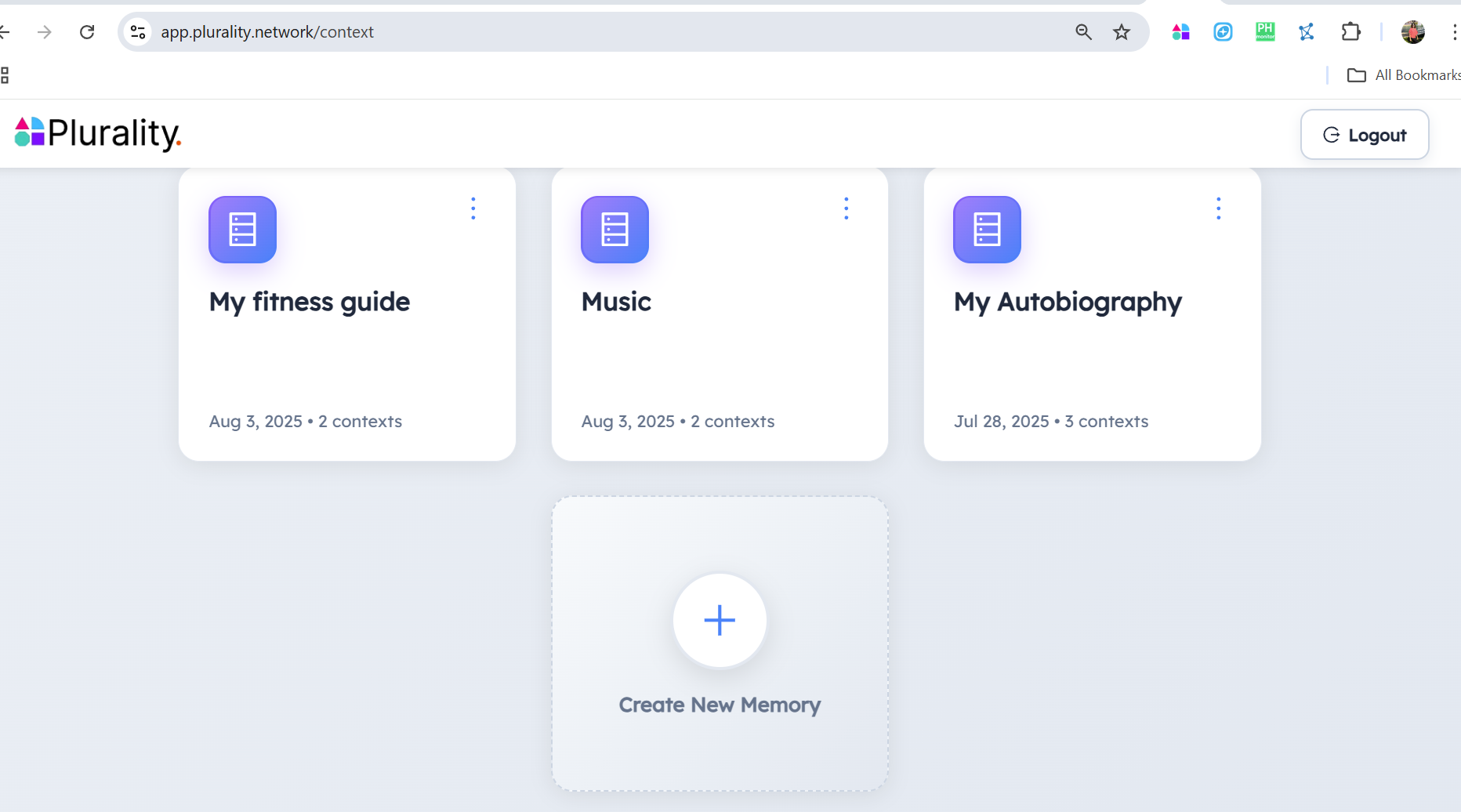
You can create new memory buckets either directly from the chat agent by saving a conversation, OR you can kickstart a new bucket from the AI memory studio.

How to Sync Memory Across ChatGPT, Claude, Gemini, Perplexity, Grok, and More

Option 1: Create new memory buckets directly from within the chat agents
How to Sync Memory Across ChatGPT, Claude, Gemini, Perplexity, Grok, and More

Option 2: Create new memory buckets from the memory studio

Memory Studio: Your Context Command Center

Memory Studio provides advanced curation tools to edit, add, delete memory buckets, or further refine memories within each bucket. It lets you:

  • Upload files in bulk to your buckets
  • Edit and refine individual memories within a bucket
  • View analytics on memory usage (soon)
  • Add meta-level system prompts on individual buckets (soon)
  • Export and backup your data (unlike platform-locked systems) (soon)

Pluto Agent: Test and Refine

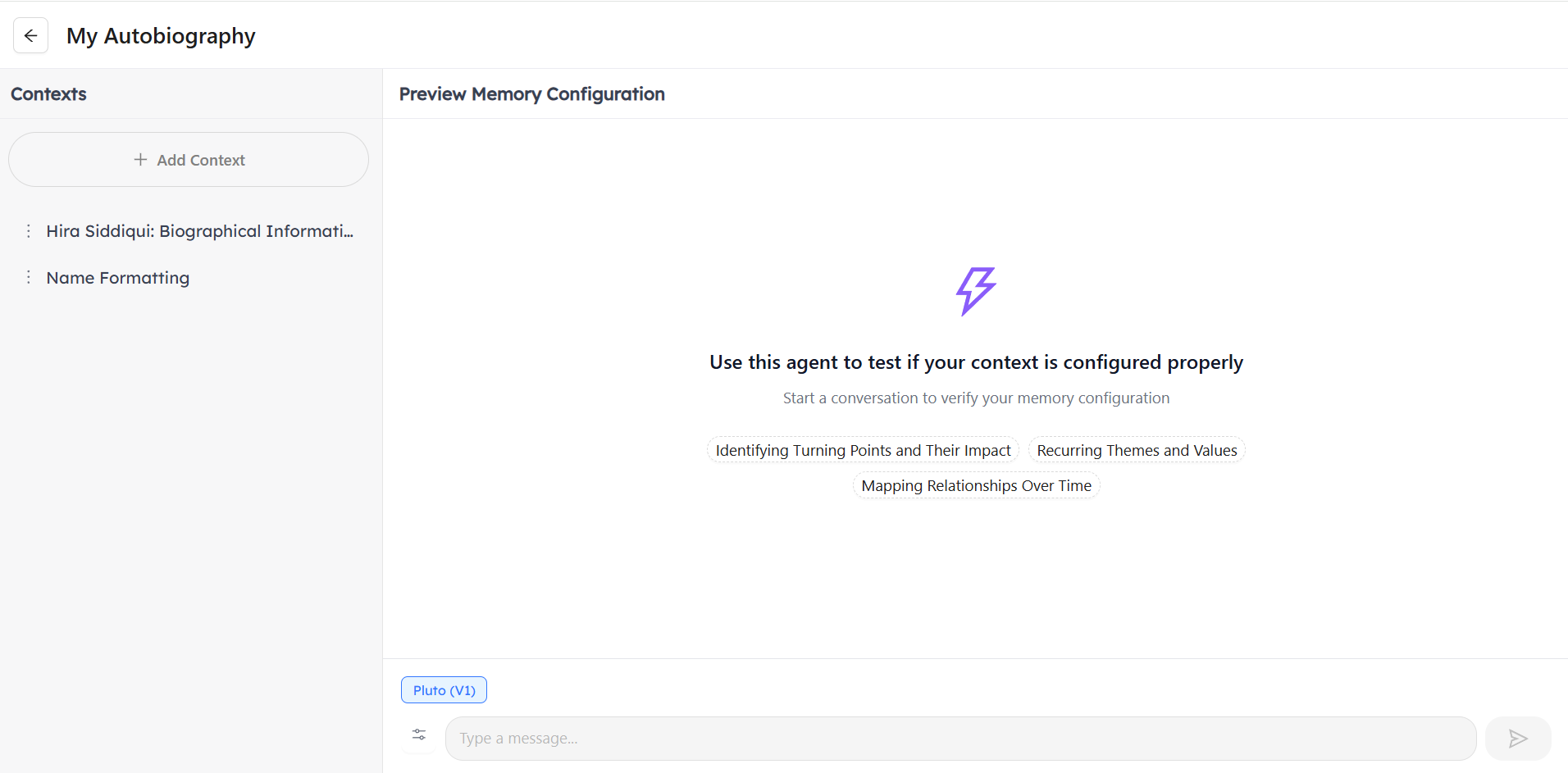
Pluto, an integrated AI agent within Memory Studio, lets you test memory buckets before real-world use. Ask questions that your memories should answer. Pluto’s responses reveal whether your bucket contains the right information and retrieves it effectively. This testing capability is completely unique. Native memory systems offer no way to evaluate memory before critical work moments.
How to Sync Memory Across ChatGPT, Claude, Gemini, Perplexity, Grok, and More

Pluto: The ontology agent that helps you build, refine, and test your memories

Leveraging Your Universal Memory

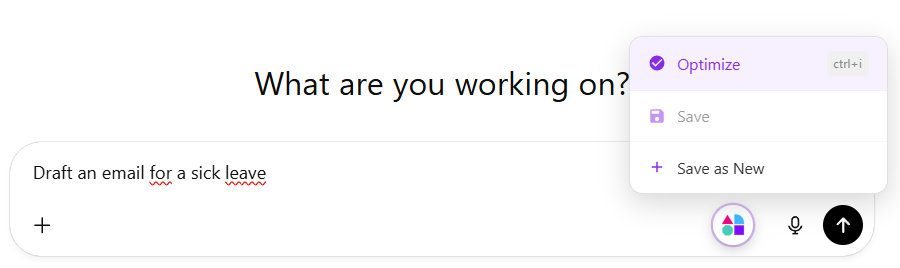
In AI Context Flow, memories are injected inline within your query/prompt with MCP Servers on the roadmap. Therefore, you can write a prompt and simply press optimize or Ctrl + i to transform.
How to Sync Memory Across ChatGPT, Claude, Gemini, Perplexity, Grok, and More

Prompt Optimization With Memory

When working with AI agents, select your desired bucket from the dropdown shown near the header at the top.

How to Sync Memory Across ChatGPT, Claude, Gemini, Perplexity, Grok, and More

Then write your prompt and press Ctrl+i to optimize your prompt, and AI Context Flow enhances it while injecting relevant memories from your selected bucket. The AI receives not just your prompt, but the critical context needed for high-quality, on-target responses.

Your input: “draft an email about the delay.”

Optimized Prompt With Context: “You are an AI assistant designed to help users draft professional emails. Your task is to explain to Acme Corp stakeholders the two-week delay in the Q4 feature release. Emphasize our commitment to quality, provide the new timeline (December 15th launch), and highlight additional testing to ensure product stability. Use a transparent but confident tone consistent with previous communications. Here are some samples of previous emails tone: `xxx`”

Prompt Optimization Without Memory

Even without memory, optimization improves your prompts. Vague queries become specific. With memory, optimization becomes remarkably sophisticated, understanding not just what you’re asking, but who you are and what success looks like.

Your input: “draft an email about the delay.”

Optimized Prompt without context: “You are an AI assistant designed to help users draft professional emails. Your task is to generate a draft email informing the recipient about a delay. Since no specific details about the delay, its reason, or the new timeline have been provided by the user, create a concise and professional general template for a delay notification email. Ensure the draft includes clear placeholders for the user to fill in the specific details relevant to their situation.”

Comparison: AI Context Flow vs. Native Memory Solutions

Feature ChatGPT Memory Claude Memory Gemini Memory AI Context Flow
Cross-platform sync No No No Yes
Memory organization No in memories, yes in project contexts Paid only No Yes
File attachments No in memories, limited in projects Yes No Yes
Web highlights No No No Yes
Selective retrieval No No No Yes
Testing capability No No No Yes (Pluto Agent)
Prompt Optimization No No No Yes

How AI Context Flow surpasses ChatGPT memory, Claude AI memory feature, and Gemini memory feature with universal AI context management

Key advantages:

  • Cross-platform functionality that no native solution can match.
  • Superior organization on all tiers.
  • Intelligent, selective retrieval avoiding context rot and reduced accuracy.
  • Proactive management with Memory Studio and Pluto.
  • Future-proof portability for adapting to new AI tools.

Real-World Impact: How Professionals Save 5+ Hours Weekly With AI Context Flow

The following are some examples of how AI Context Flow can save professionals time.

Freelance Consultant Managing Multiple Clients

Sarah runs a marketing consultancy with five active clients. Before AI Context Flow, she spent 90 minutes daily managing context across tools.

Solution: Five client-specific memory buckets containing brand guidelines, audience personas, strategic priorities, and stakeholder preferences.

Results: 8 hours saved weekly on context management. 40% reduction in revision time. Took on a sixth client without increasing working hours.

Content Creator Maintaining Brand Voice

Marcus creates content across blog posts, YouTube, podcasts, and social media. His ChatGPT memory captured his voice, but Claude and Gemini’s outputs felt generic.

Solution: A “Personal Brand” bucket with writing examples, voice guidelines, expertise areas, and format-specific sub-buckets.

Results: Editing time dropped from 45 to 15 minutes per piece. Uses different AI agents based on their strengths, i.e., ChatGPT for ideation, Claude for research-heavy analysis, and Gemini for current information, and all of them maintain his distinctive voice.

Software Developer Coordinating Coding Assistants

Priya’s team uses multiple coding assistants, but context about architecture, conventions, and decisions didn’t transfer between tools.

Solution: Project-specific buckets with architecture docs, coding standards, common issues, and recent decisions.

Results: Team saved 12-15 hours weekly on context explanation. Code quality improved with AI suggestions aligned to their patterns. Onboarding new developers became easier with accessible institutional memory.

Why Should You Use A Universal AI Memory System

From Tools to Integrated Intelligence

Universal memory transforms AI agents from separate tools into a team of specialists sharing the same briefing. You’re orchestrating an integrated intelligence network, maintaining continuity across specialized capabilities. This is exactly how effective human teams operate.

Curate And Maintain Freshness of AI Memories

Platform-specific memory accumulates outdated information that’s difficult to audit or update. Universal memory with organized sections prevents this decay. Archive completed projects, update changed strategies once, and maintain quality AI interactions over months and years.

Economic Efficiency

Better context means improved first-draft quality, reducing revision time, and the bulk of time spent on AI-assisted tasks. Many professionals maintain premium subscriptions only for the most-used platforms, using free tiers effectively elsewhere through targeted context injection. This reduces token usage and subscription costs substantially.

Future-Proofing Your Workflow

Your context exists independently of any platform. When superior AI tools emerge, experiment immediately with full context. Platform-agnostic memory protects your investment and ensures you always use the best tool for each task.

Recap: Quick Implementation Guide

Installation (5 minutes)

  1. Install the browser extension supported currently for Chrome, Opera, Edge, and Brave browsers.
  2. Create your account by signing up (free tier available)
  3. Verify platform integration by visiting ChatGPT, Claude, or Gemini, and check if you see the AI Context Flow icons

Create Your First Memory Bucket (5 minutes)

  1. Plan your structure: Client-based, project-based, domain-based, or role-based organization.
  2. Create and name your first bucket with a clear, descriptive name
  3. Add initial memories: Upload 3-5 key documents, save an important conversation, or add manual notes

Your First Enhanced Conversation (2 minutes)

  1. Select your bucket from the AI Context Flow dropdown in any supported platform.
  2. Write a natural query without manually providing context
  3. Press Ctrl+i to optimize and inject relevant memories
  4. Iterate and refine by adding missing context as you discover gaps

Test with Pluto (5 minutes)

  1. Access Memory Studio and navigate to your bucket
  2. Ask Pluto questions, and your memories should answer
  3. Evaluate and improve by adding missing information or correcting problems

Comparison: AI Context Flow vs. Native Memory Solutions

Get started with AI Context Flow today for an interconnected AI experience, anywhere you go!
Conclusion

The multi-agent future is accelerating. Professionals who thrive won’t pick a single platform; they’ll strategically leverage the best tool for each task, orchestrating specialized agents into an integrated intelligence network.

But that’s only possible with universal AI memory. Without it, multi-agent workflows remain hobbled by AI context fragmentation, repetitive explanations, and inconsistent outputs.

AI Context Flow solves this fundamental AI context synchronization problem. Build AI context once, organize intelligently into memory buckets, and leverage it everywhere. Whether using ChatGPT memory for creative work, the Claude AI memory feature for analysis, or the Gemini AI memory feature for Google Workspace integration.

The benefits are concrete:

  • Save 5-10 hours weekly on AI context repetition
  • Generate better outputs through a comprehensive AI context
  • Reduce subscription costs with better AI context management
  • Future-proof your workflow with platform-agnostic AI context

The question isn’t whether universal AI context management will become standard; the question is, how soon can we do it? The context of AI conversations is too valuable to remain trapped in isolated silos. The question is whether you’ll adopt synchronized AI context now and gain a competitive advantage, or wait while competitors pull ahead.

Install AI Context Flow now and transform your AI workflow from isolated tools into an integrated intelligence system that remembers who you are, what you’re working on, and what success looks like. Regardless of which platform you’re using.

Your context is valuable. Make it portable. Make it work everywhere. Make it work for you.

Stay in Flow wherever you go with AI Context Flow!

Frequently Asked Questions

Can ChatGPT memory sync with Claude AI memory and Gemini memory?

No, ChatGPT memory, Claude AI memory feature, and Gemini memory feature cannot sync natively. Each platform operates independently: ChatGPT memory stores information only within OpenAI’s ecosystem, Claude AI memory feature (Projects) works exclusively in Claude, and Gemini memory feature remains isolated in Google’s Gemini platform. Your AI context remains trapped in separate silos with no built-in cross-platform synchronization.

Professionals save 5-10 hours weekly by eliminating AI context repetition across platforms. Here’s the breakdown: If you switch between ChatGPT memory, Claude AI memory feature, and Gemini memory 5 times daily, spending 5-10 minutes explaining context each time, that’s 25-50 minutes daily wasted on context repetition. Over a week, this adds up to approximately 6.5 hours, nearly a full workday lost to administrative overhead. With universal AI context synchronization, you build your context once in organized memory buckets and instantly inject relevant AI context into whichever platform you’re using.

Each platform takes a different approach to AI context management: ChatGPT memory uses automatic learning from conversations, storing information as a flat, unorganized list. It’s free, requires no setup, but suffers from “memory bleed” where different projects get jumbled together. ChatGPT memory cannot attach files persistently and offers no organizational structure. Claude AI memory feature is built around Projects, organized workspaces with custom instructions and file uploads (up to 200MB). The Claude AI memory system offers superior organization compared to ChatGPT memory but requires a paid Claude Pro subscription ($20/month). Each Project maintains an isolated AI context. Gemini memory feature and Gemini AI memory feature integrate uniquely with Google Workspace, automatically pulling AI context from Gmail, Google Drive, and Calendar. The Gemini memory system works best for users embedded in Google’s ecosystem, but requires a Gemini Advanced subscription.

Yes, AI Context Flow offers a free tier that enables cross-platform AI context synchronization across ChatGPT memory, Claude AI memory feature, Gemini memory feature, Perplexity, and Grok. This is significant because even paid features like Claude AI memory feature ($20/month for Pro) and Gemini AI memory feature (requires Gemini Advanced at $20/month) cannot achieve cross-platform synchronization. ChatGPT’s memory is free but platform-locked.

Memories are encrypted in transit (TLS 1.3) and at rest (AES-256). They are processed inside Trusted Execution Environments, the strongest level of hardware security available today. This means even Plurality Network cannot access your content without permission. You can export and delete all data anytime.

Yes. Better context leads to better outputs, reducing iterations and helping you stay within free tier limits. Many users accomplish more with free tiers + AI Context Flow than paid tiers alone.

Go to our pricing section to view the details of the freemium and premium models.

Yes, team plans support shared buckets, creating institutional memory across your team’s AI interactions.

Export all memories in standard formats (JSON, markdown, PDF) anytime. Your memories are your data with complete ownership and portability.

No. Optimizing the prompts with the relevant context takes a few seconds, but then the enhanced prompts are more precise, so AI platforms respond faster overall.

🍪 This website uses cookies to improve your web experience.