



- Does Grok AI Remember Across Chats or Sessions
- What Grok AI Remembers About You Across Conversations
- How to Manage Your Grok Memory
- The Problem: Your Grok Memory is Trapped
- Two Ways to Use Grok Memory Across AI Platforms (Manual and Automated)
- Using Grok Memory Across Different Platforms Unleashes New Superpowers!
- Why This Changes Everything for Grok Users
- Your Next Step: Stop Starting Over
- Frequently Asked Questions (FAQs)
Does Grok AI Have Persistent Memory Across Conversations? Complete 2026 Guide
By Hira • Feb 9, 2026
In this guide: you’ll learn how Grok’s memory actually works, where it hits a hard wall, and the workaround that saves professionals hours every week.
Does Grok AI Remember Across Chats or Sessions?
You spend 15 minutes explaining your project to Grok, get perfect results. The next day, you open a new conversation and… Grok remembers everything. Your work context, preferences, even your communication style. No need to repeat yourself.
This is Grok’s memory feature in action.
xAI launched persistent memory in April 2025 so you don’t waste time re-explaining the same information. Tell Grok once that you’re a software developer working on React projects, and it remembers for all future conversations.
But here’s the catch: This memory only works inside Grok.
Switch to ChatGPT for creative writing? Start from zero. Need Claude for code reviews? Explain everything again. Use Gemini for research? You’re back to square one.
If you use multiple AI tools (and most people do), you’re wasting 5-10 hours every week just repeating the same context over and over.
Try this calculator to see your actual time loss:
The solution? Tools like AI Context Flow let you build memory once and use it everywhere – across Grok, ChatGPT, Claude, Gemini, and more.
What Grok AI Remembers About You Across Conversations
Grok’s memory system stores different types of information to personalize your conversations. Here’s what it keeps track of:
| MEMORY TYPE | EXAMPLES |
|---|---|
| Personal Preferences | Dietary restrictions, hobbies, interests, location |
| Work Information | Your job title, company, industry, projects |
| Communication Style | Formal vs casual tone, detail level preferences |
| Technical Preferences | Programming languages, tools, frameworks you use |
| Project Details | Ongoing work, deadlines, team members, goals |
| Content Preferences | Writing style, format preferences, examples |
Real Example of Grok Memory in Action
Sarah told Grok across several conversations:
- She’s training for a marathon
- She’s allergic to shellfish
- She prefers high-protein meals
- She works remotely from Denver
Days later, when Sarah asked for dinner recipes, Grok automatically suggested:
- High-carb pasta good for training
- No shellfish ingredients
- High-protein additions
- Altitude-adjusted cooking times for Denver
Grok didn’t just remember facts – it connected them intelligently to provide relevant suggestions.
How to Manage Your Grok AI Memory
Ok, so Grok has memory. But how do you enable it? How do you see what memories are stored? How do you manage or delete memories? And most importantly, how do you export or reuse your memories generated inside Grok on other AI platforms? Let’s dive in!
How to Enable or Disable Grok Memory
According to xAI’s official documentation, you have full control over memory:
To Turn Memory ON:
- Open Grok settings
- Navigate to Data Controls
- Toggle “Memory” to ON
- Grok will start remembering from new conversations
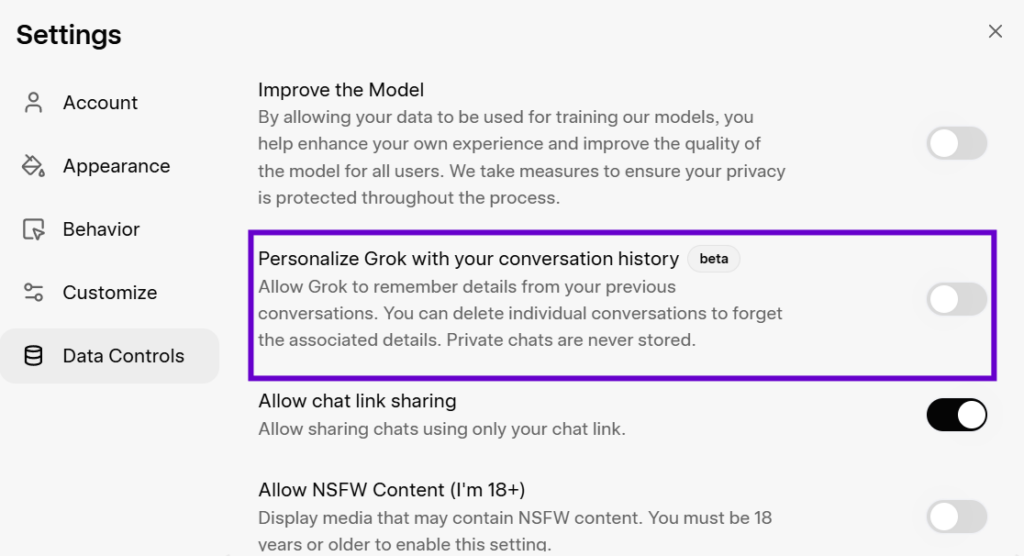
To Turn Memory OFF:
- Go to Settings → Data Controls
- Toggle “Memory” to OFF
- Grok stops creating new memories (existing ones remain unless deleted)
Important: Turning off memory doesn’t delete existing memories – it just stops creating new ones. You need to manually delete memories you don’t want.
How to See What Grok Remembers
Finding your stored memories is simple:
Step 1: Open Grok (grok.com or mobile app)
Step 2: Click your profile icon
Step 3: Go to Settings → Data Controls
Step 4: Scroll to the “Memory” section
You’ll see a list of everything Grok has stored about you. Each memory shows when it was created and what information it contains.
Note: If you are in EU/UK, you unfortunately cannot use Grok’s native memory feature.
In this case, use AI Context Flow for storing and using your memories not just in Grok, but across all major AI platforms.
How to Delete Grok Memories
You have two options for removing memories:
Option 1: Delete Individual Memories
- View your memories in Settings → Data Controls
- Find the specific memory you want to remove
- Tap the delete icon (trash can) next to it
- Confirm deletion
Option 2: Delete All Memories at Once
- Go to Settings → Data Controls
- Scroll to “Memory” section
- Click “Clear All Memories”
- Confirm you want to delete everything
Pro Tip: Review your memories monthly and delete outdated information. Old project details or changed preferences can confuse Grok’s responses.
How to Use Private Chat Mode
Want to have a conversation without Grok remembering it? Use Private Chat mode:
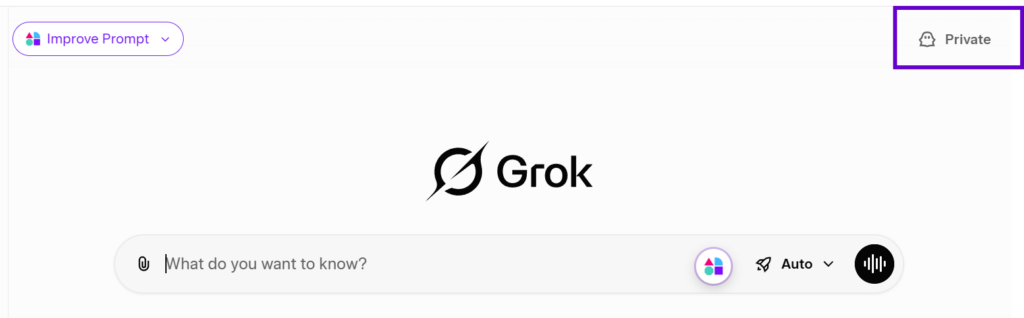
- Look for the ghost icon when starting a new chat
- Click it to enable Private Chat
- Have your conversation
- Everything is excluded from memory
- Logs are automatically deleted within 30 days
Perfect for sensitive information, one-time queries, or testing ideas you don’t want stored.
The Problem: Your Grok Memory is Trapped
Here’s where Grok’s memory hits a wall. Everything you’ve taught Grok stays locked inside Grok.
What Happens When You Switch AI Platforms
Let’s follow Marcus, a content creator, through his typical workday:
9:00 AM – Using Grok
Marcus uses Grok for unfiltered market analysis. Over time, Grok learns:
- His content niche (AI productivity)
- His target audience (professionals aged 25-45)
- His brand voice (conversational, educational)
- His posting schedule and content types
11:00 AM – Switching to ChatGPT
Marcus needs creative social media captions. ChatGPT is better for this, but…
- All Grok memory is gone
- He re-explains his brand, audience, voice
- Time lost: 8 minutes
- First drafts need heavy editing
2:00 PM – Using Claude
Marcus needs technical blog post outlines. Claude excels here, but…
- All previous context vanished again
- He re-explains topic, audience, style
- Time lost: 10 minutes
- Outline doesn’t match his voice initially
End of Day: 30+ minutes wasted just repeating context.
Multiply by 5 days = 2.5 hours weekly. That’s 130 hours annually – over 3 full work weeks lost to explaining the same things repeatedly.
Consider an AI agent that knows your preferences, work style, communication patterns, and workflows. Switching to a new platform means teaching the new agent everything from scratch. This process can take hours or weeks of re-explaining context, thereby deterring users from switching platforms.
Why Different AI Platforms Can't Talk to Each Other
Each AI platform uses memory as a retention tool. Your conversations become valuable data that keeps you locked to their ecosystem. Once users experience personalized, continuous interactions, switching becomes exponentially harder.
| PLATFORM | WHAT IT REMEMBERS | WHERE IT'S TRAPPED |
|---|---|---|
| Grok | Your preferences, projects, style | Can't access in ChatGPT |
| ChatGPT | Conversation history, custom instructions | Can't access in Claude |
| Claude | Project docs, instructions, files | Can't access in Gemini |
| Gemini | Google Workspace integration | Can't access in Perplexity |
This creates an impossible choice: use the best AI for each task, or maintain context that makes AI useful.
Most people choose consistency over capability, limiting their productivity.
Two Ways to Use Grok Memory Across AI Platforms (Manual and Automated)
You don’t have to accept trapped memories. Here are three practical methods to maintain your context when switching between AI tools.
Method 1: Manual Copy-Paste (Free but Time-Consuming)
The basic approach works but requires effort:
Export from Grok:
- Copy important conversation details manually
- Save key memories in a text document
- Take screenshots of complex information
Import to Other AI:
- Paste context at the start of each new conversation
- Attach files or screenshots
- Explain connections between information
Reality Check: This works for occasional switches, not daily workflows. You’ll spend 5-10 minutes per switch maintaining context manually.
Method 2: AI Context Flow (Automated Solution)
AI Context Flow creates a universal memory layer that works across all AI platforms. This browser extension syncs your context between Grok, ChatGPT, Claude, Gemini, Perplexity, and more.
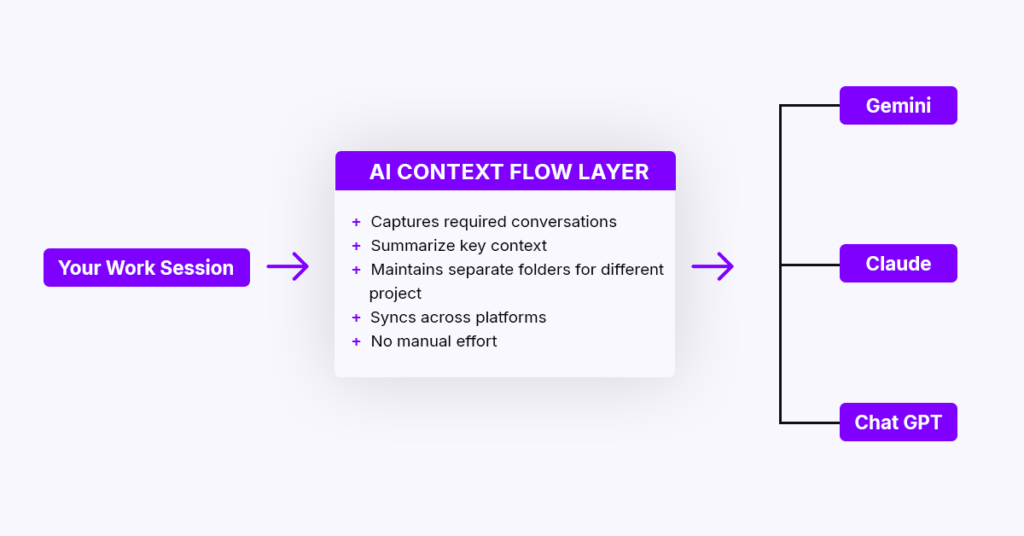
How AI Context Flow Works with Grok:
Step 1: Save Your Important Grok Conversations
- Click the AI Context Flow icon while in Grok
- Select “Save to Memory Bucket”
- Choose an existing bucket or create a new one (like “Marketing Projects”)
- Your conversation context is now portable
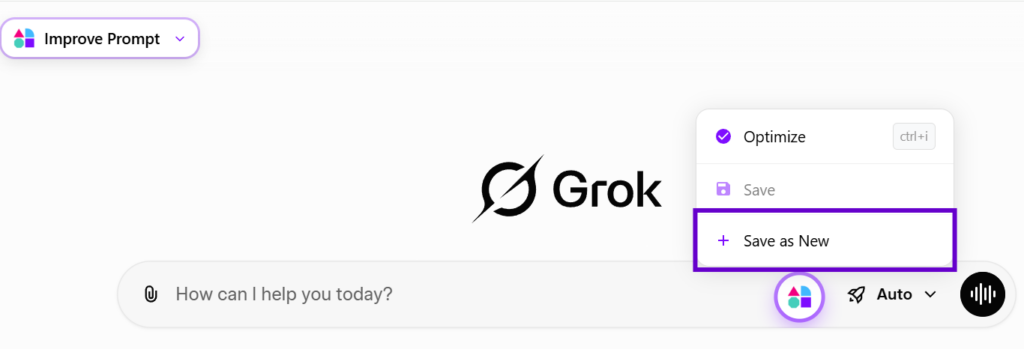
Step 2: Organize Your Memory
- Go to the memory studio and create different buckets for different projects
- Upload files and documents
- Keep saving relevant chats over time
- Add manual notes or highlights from across the web
- Everything stays organized and accessible
Step 3: Use Everywhere
- Open ChatGPT, Claude, or any other AI
- Select your memory bucket
- Press Ctrl+i to inject relevant context
- AI responds with full awareness of your project
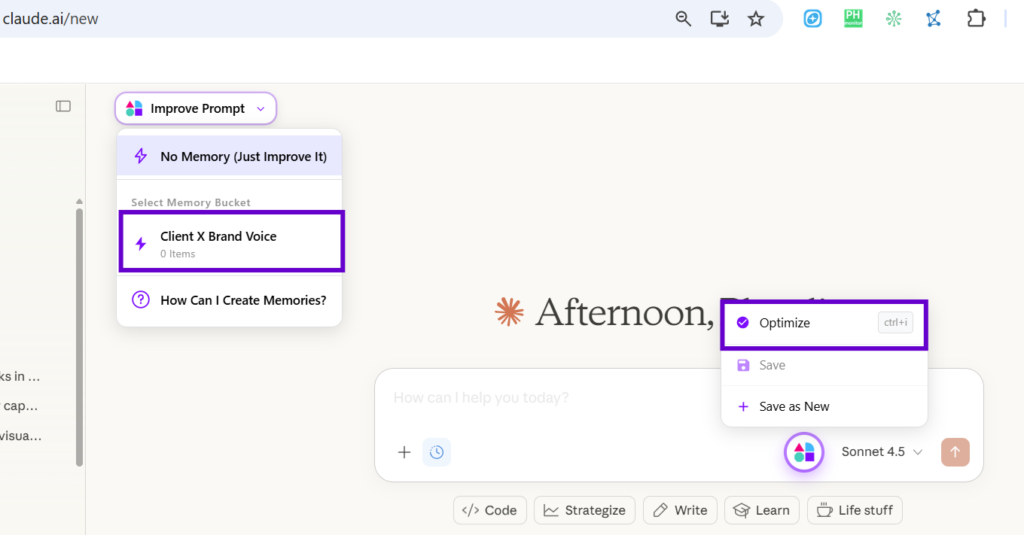
Use Grok memory on other AI platforms like Claude or ChatGPT Real Results:
- Freelancer managing 5 clients: Saved 8 hours weekly
- Content creator: Reduced editing from 45 to 15 minutes per piece
- Development team: Saved 12-15 hours weekly on context explanations
This organized approach is part of Plurality Network’s broader vision for portable AI context that travels with you everywhere. Read our 5 minute guide to get started!
Using Grok Memory Across Different Platforms Unleashes New Superpowers!

Here’s the daily workflow that saves professionals 5-10 hours weekly:
Morning in Grok:
- Discuss project strategy
- Grok learns your preferences
- Save conversation to “Project X” bucket
Afternoon in ChatGPT:
- Need creative content
- Select “Project X” bucket
- ChatGPT has full project context instantly
Evening in Claude:
- Need technical analysis
- Same “Project X” bucket
- Claude knows the full background
No repetition. No wasted time. One context across all platforms.
Why This Changes Everything for Grok Users
Use Grok for What It Does Best
Grok excels at:
- Unfiltered, direct analysis
- Real-time information from X/Twitter
- Controversial or edge-case topics
- Massive context windows (up to 2 million tokens)
With universal AI memory, you can use Grok for these strengths, then switch to other platforms without losing context:
ChatGPT for creative writing and brainstorming
Claude for complex technical analysis
Gemini for Google Workspace integration
Perplexity for research with citations
Stop Choosing Between Platforms
Before universal memory, you had two bad options:
Option 1: Stick to one AI platform
- Miss out on specialized strengths
- Accept suboptimal results
- Limited by platform weaknesses
Option 2: Use different platforms
- Waste hours on context repetition
- Inconsistent results
- Frustrating workflow
With AI Context Flow, you get a third option:
Option 3: Use the best AI for each task
- ✅ No context loss
- ✅ Consistent quality
- ✅ Time saved
- ✅ Better results
Real Impact: Hours Saved Weekly
Let’s break down the actual time savings:
| WORKFLOW | WITHOUT UNIVERSAL MEMORY | WITH AI CONTEXT FLOW | TIME SAVED |
|---|---|---|---|
| Switch between 3 AIs daily (5 times) | 25-50 min/day | 2 min/day | ~5-10 hours/week |
| Manage 3 different clients | 45 min/day context setup | 5 min/day | ~6 hours/week |
| Edit AI outputs for consistency | 2 hours/day | 45 min/day | ~6.25 hours/week |
Average professional saves 5-10 hours weekly – that’s nearly a full workday reclaimed.
Your Next Step: Stop Starting Over
You’ve learned how Grok’s memory works, how to control it, and how to break free from platform lock-in.
The old way meant choosing between:
- Grok’s unfiltered analysis OR ChatGPT’s creativity
- Building context once OR using multiple platforms
- Wasting time on repetition OR accepting limited tools
The new way gives you everything:
- Use Grok for direct analysis
- Switch to ChatGPT for creative work
- Try Claude for technical tasks
- Keep perfect context across all of them
What changes when you stop rebuilding context:
✅ Your workflow becomes strategic – Use the best AI for each specific task
✅ Your outputs stay consistent – Same quality across all platforms
✅ Your time becomes yours – Spend it on work, not explanations
✅ Your AI toolkit expands – Try new platforms without fear
Ready to stop the repetition cycle?
AI Context Flow gives you portable memory that works with Grok and every other major AI platform. Your conversations, preferences, and project details travel with you everywhere.
Key Takeaways
- Grok AI has persistent memory since April 2025 – it remembers your preferences, projects, and style across conversations within Grok
- You have full control – view, edit, and delete memories anytime in Settings → Data Controls
- Grok memory stays in Grok – it doesn’t transfer to ChatGPT, Claude, Gemini, or other AI platforms
- Professionals waste 5-10 hours weekly repeating context when switching between AI platforms
- AI Context Flow solves platform lock-in – build memory once, use it everywhere across all AI tools
- Use each AI for its strengths – Grok for analysis, ChatGPT for creativity, Claude for technical work, all with consistent context
The solution is simple: build your context once in organized memory buckets, then seamlessly access it across Grok and all your other AI platforms. This approach saves hours weekly and lets you use the best tool for each job.
Frequently Asked Questions
Does Grok AI have persistent memory like ChatGPT?
Yes, Grok launched persistent memory in April 2025. It works similarly to ChatGPT’s memory – remembering your preferences, work details, and conversation history across sessions. However, Grok’s memory only works within Grok and isn’t available in EU/UK regions. Unlike ChatGPT, Grok doesn’t have a separate “custom instructions” field – instead, you can tell it to remember specific things directly. If you still want to use memory features in Grok while being in EU/UK, use memory extensions like AI Context Flow.
Does Grok AI have custom instructions like ChatGPT?
No, Grok doesn’t have a dedicated “Custom Instructions” field like ChatGPT’s two 1,500-character input boxes. Instead, Grok uses its memory system to achieve the same result.
In ChatGPT: You set instructions once in Settings → Custom Instructions
In Grok: You tell it directly: “Remember that I prefer Python for code examples” or “Remember I’m a marketing professional”
For organized instructions: Use Grok 4 Projects feature, which lets you create context-specific workspaces with their own guidelines, similar to custom instructions but project-based.
Example Grok Instructions:
– “Remember to always be concise and skip long preambles”
– “Remember that I work in healthcare and need HIPAA-compliant suggestions”
– “Remember to format code in TypeScript, not JavaScript” These preferences persist across all Grok conversations, just like ChatGPT’s custom instructions persist across ChatGPT conversations.
The catch? Both are platform-locked. Your Grok preferences don’t work in ChatGPT, and vice versa. To use the same instructions across all AI platforms, try AI Context Flow.
How do I turn on memory in Grok AI?
Memory is automatically enabled in Grok by default. To check or change it: 1) Open Grok, 2) Click your profile icon, 3) Go to Settings → Data Controls, 4) Toggle the “Memory” switch. You can turn it off anytime, but this won’t delete existing memories – you need to delete those manually if wanted.
Can I see what Grok remembers about me?
Yes. Go to Settings → Data Controls and scroll to the “Memory” section. You’ll see a complete list of everything Grok has stored – including when each memory was created and what information it contains. You can review and delete individual memories or clear everything at once.
How do I delete Grok memories?
You have two options: Delete individual memories by going to Settings → Data Controls, finding the specific memory, and clicking the delete icon. Or delete all memories at once by clicking “Clear All Memories” in the same section. For sensitive conversations, use Private Chat mode (ghost icon) – these conversations are automatically excluded from memory and deleted within 30 days.
Can I use Grok memory with ChatGPT or Claude?
No, Grok’s native memory doesn’t transfer to other AI platforms. Each platform keeps memories isolated – your Grok memory stays in Grok, ChatGPT memory stays in ChatGPT, etc. To use your Grok context across platforms, you need a tool like AI Context Flow which creates a universal memory layer that works everywhere.
What's the difference between Grok memory and Grok Projects?
Grok memory stores your general preferences and information across all conversations. Grok Projects (in Grok 4) lets you organize different work into separate containers – each Project can have its own files, notes, and conversation history. Think of memory as your global preferences and Projects as organized workspaces for specific tasks or clients.
How much time can I save with cross-platform AI memory?
Professionals report saving 5-10 hours weekly by eliminating context repetition. If you switch between Grok, ChatGPT, and Claude 5 times daily (spending 5-10 minutes explaining context each time), that’s 25-50 minutes daily or approximately 6.5 hours weekly. With universal memory through AI Context Flow, you build context once and use it everywhere.
Does AI Context Flow work with Grok's free tier?
Yes, AI Context Flow works with both free and paid tiers of Grok (and all other AI platforms). Better context actually helps you get more from free tiers by improving output quality and reducing the need for multiple attempts. Many users accomplish more with free AI tiers + AI Context Flow than with paid tiers alone.
Is my data secure in AI Context Flow?
Yes. AI Context Flow uses enterprise-grade security: TLS 1.3 encryption in transit, AES-256 encryption at rest, processing in Trusted Execution Environments (hardware-secured). You can delete all data anytime.
Can I share my Grok memories with my team?
Grok’s native memory is individual only. However, AI Context Flow team is working on enabling shared memory buckets that your entire team can access. This is perfect for maintaining consistent brand voice, sharing client context, or coordinating coding standards across team members using different AI platforms.