



- What is AI Context Switching for Freelancers?
- Different Projects Mix-Up: AI Memory Bleed Problem
- Frequent Context Switching → Hidden Time Loss → Missed Growth Opportunities.
- How Context Switching and Poor AI Memory Hurt Freelancers’ Creative Output
- Does Universal AI Memory Help Freelancers Across Various Industries?
- Create A Universal AI Memory System For All Your Clients
- How To Build Your First Client Profile (Memory Bucket)
- Universal AI Memory Is Not a Tool Upgrade, It Is a Workflow Correction For Freelancers!
- Frequently Asked Questions (FAQ) about Universal AI Context
How Universal AI Memory Can Solve Freelancers' Client Context Switching Crisis
By Alev • Dec 23, 2025
Everyone acknowledges context switching as the productivity killer, but no one has ever proposed a solution for freelancers across any industry segment. I mean, thanks to AI for smarter solutions with platform lock-ins, but what if one agent faces downtime or you need to use different agents, i.e., select the best AI tool for any given task? That vicious cycle never stops, restricting you to a single platform and making productivity or multi-project management feel like a battle.
- How do you minimize the time lost in meeting client expectations by manually recalling the pointers?
- How do you switch context without activating writer’s block?
- How do you switch platforms without ever forgetting the client brief, brand tone, and preferred style?
💡 Are you also struggling with the same problem? Install AI Context Flow to join 1000+ freelancers who got rid of AI context switching once and for all.
What is AI Context Switching for Freelancers?
Here’s how a typical Monday for a freelance content strategist with 5 active clients looks like:
Morning begins with drafting social media content for a tech startup that prefers casual, emoji-filled posts. By mid-morning, you’re writing formal blog posts for a financial services firm where every word must sound authoritative and compliance-aware. After lunch, an e-commerce client needs urgent web copy focused on conversion rates and persuasive language. Late afternoon brings a non-profit newsletter requiring emotional storytelling and donor engagement tactics. Before you log off, another client emails requesting revisions to their brand guidelines document.
Each time you switch clients, you face the same exhausting reality: your AI assistant has forgotten everything. ChatGPT doesn’t remember that the tech startup hates corporate jargon. Claude can’t recall that the financial firm requires conservative language. Gemini has no idea what the e-commerce brand’s target demographic is. You spend the first 10-15 minutes of every work session re-explaining project insights, rebuilding what the AI should already know but doesn’t.
This is the freelancer’s context-switching crisis, and it’s silently draining thousands of dollars from your annual income.
The average freelancer managing multiple clients loses 10-15 hours per week just on management, time that generates zero billable value. That’s nearly two full workdays every week spent on administrative overhead that AI was supposed to eliminate, not create anew.
💡 Are you tired of explaining the same client brief over and over across different AI tools? AI Context Flow creates universal AI memory that works across ChatGPT, Claude, Gemini, and more. Join 1000+ freelancers saving 10+ hours every week.
Different Projects Mix-Up: AI Memory Bleed Problem
Information can zip through your brain at around 250 mph thanks to millions of neurons and synapses, but maintaining 5 brand voices simultaneously is equivalent to overworking yourself. This is why you have chat agents for some moments of relief in busy routines. And now, with chat agents too, there is a constant threat of memory bleed, where details of project A bleed into project B. “No memory” segregation is much to blame in this case.
Freelancers working across multiple clients face a constant risk of memory bleed, where details from one project bleed into another. This happens most frequently when using AI tools without proper memory separation and prompt optimization.
You spend Monday immersed in content for a casual consumer brand, adopting their playful tone and emoji-heavy style. Tuesday arrives, and you’re writing for a corporate client. However, your brain and your AI assistant are still under the spell of yesterday’s casual approach, which results in formal business content that includes phrases like “let’s dive into your quarterly earnings!” or “your ROI is looking pretty solid!”
Language that would be perfect for the consumer brand becomes completely inappropriate for corporate communications.
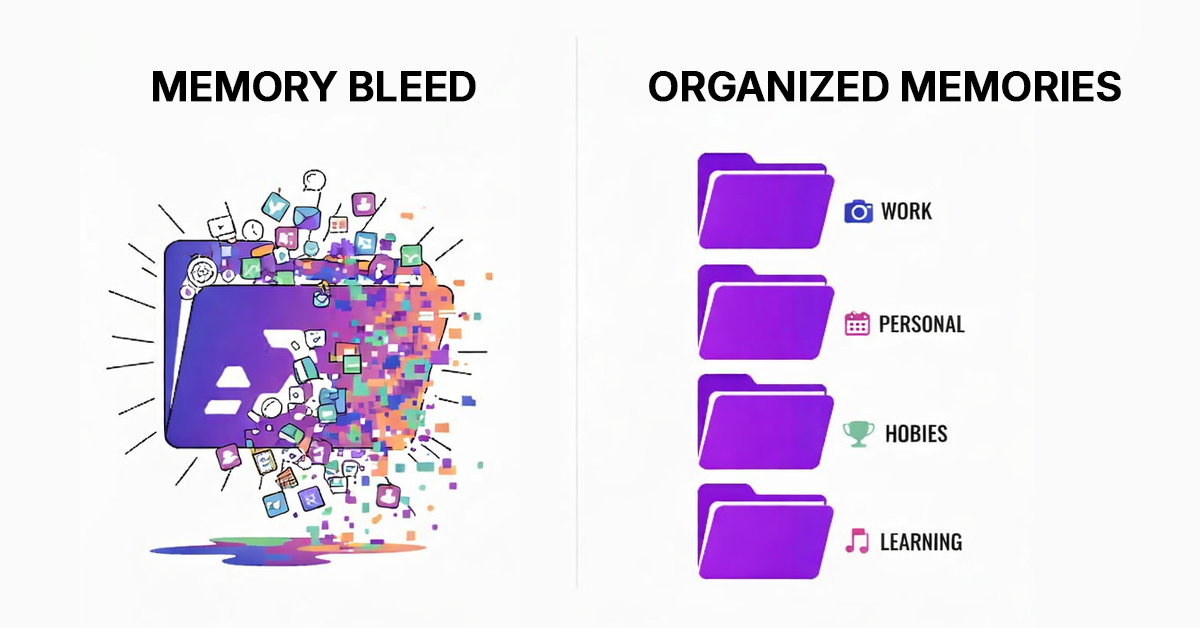
Frequent Context Switching → Hidden Time Loss → Missed Growth Opportunities.
What often goes unnoticed is that context loss not only wastes time but also breaks automated AI workflows. When AI tools start over, you need to redesign their process repeatedly. Tasks that should flow sequentially become fragmented, turning what should be a streamlined workflow into disconnected micro-steps. This is where the AI workflow optimization you spent months to fix quietly fails.
Even workflows do not perform as intended when continuity is interrupted, and for freelancers, the loss is huge. Let’s quantify the cost of context switching for freelancers.
Every time you begin work for a different client, you face a predictable sequence of time-consuming steps. You open your AI tool of choice and realize it knows nothing about this particular client. You spend 5-10 minutes explaining the project background, describing the target audience, specifying the tone requirements, and providing examples of what good output looks like. Then you finally get to the actual work.
For a freelancer managing 5 clients who switch between them 3 times daily, that’s 15 context switches per week. At 10 minutes per switch, you’re losing 150 minutes per week, which equals 10 hours per month or 120 hours per year. If your billing rate is $75 per hour, that’s $9,000 per year spent on overhead that generates no client value and no revenue. At $100 per hour, the cost rises to $12,000 annually.
Calculate how much time you’ve lost this week: Check Here
The Compounding Cost of AI Context Switching: $9,000-$24,000 Lost Annually
The time loss compounds in ways that aren’t immediately obvious. When you spend 10 minutes rebuilding context, you’re not just losing 10 minutes. You’re also experiencing:
Cognitive switching costs: Your brain needs additional time to fully transition between different client mindsets, brand voices, and project requirements. Research on task switching suggests this “mental gear shifting” can cost an additional 5-10 minutes of reduced efficiency even after you’ve explained everything to your AI.
Creative disruption: Deep, creative work requires sustained focus. Every time you switch, it interrupts your flow state, making it harder to produce your best work. You might physically switch clients in seconds, but your mind takes much longer to fully commit to another version.
Quality degradation: Rushed context setup often means incomplete information transfer. You explain the basics but forget subtle nuances, past client feedback, or specific preferences that only emerge after several rounds of work. The outputs are more likely to miss the mark, requiring more revision cycles.
Decision fatigue: Each client switch forces numerous micro-decisions. Which past examples should I reference? What tone guidelines matter most? Which project details are relevant? These decisions, repeated throughout the day, drain mental energy that could be devoted to creative problem-solving.
When you account for these compounding effects, the true cost of context switching likely doubles. That $9,000 annual loss for a $75/hour freelancer becomes $18,000. The $12,000 loss at $100/hour becomes $24,000. This is money you’re leaving on the table, not because you lack skills or work ethic, but because your tools don’t remember what you’ve already taught them.
But as soon as the workflows stop breaking due to a lack of memory sync, optimization becomes a natural byproduct rather than an ongoing effort.
💡 AI Context Flow is the best productivity tool for freelancers, eliminating context-switching overhead when managing multiple clients. Build client memory profiles once, access them everywhere.
How Context Switching and Poor AI Memory Hurt Freelancers’ Creative Output
Ideation across multiple client projects is the most impacted ability.
Is freelance work all about the execution of predefined tasks? They generate ideas, develop creative concepts, and provide strategic thinking that clients value highly. But ideation suffers dramatically when AI tools lack persistent memory across clients.
When you’re brainstorming content ideas for a client, the AI should instantly understand:
- Market dynamics for the client in focus
- Past successful campaigns
- Your brand’s audience preferences
- Strategic goals within the stipulated timeframe
Without these pointers, the output is typical AI slop in response to a shallow prompt. The AI might propose “10 tips for improving productivity” when your client specifically avoids listicles, or suggest video content when your client’s audience demonstrably prefers written formats. That pushes you back to the place where you started <buzz killer>
1. How Does The Ideation Workflow Look Like With Poor Memory?
A typical brainstorming session without proper context looks like this:
Step 1: You ask your AI for blog topic ideas. It returns generic suggestions based on broad industry trends. You realize these won’t work because the AI doesn’t know this client’s unique positioning, so you spend 10 minutes explaining their differentiation strategy, target persona, and content performance history.
Step 2: You request ideas again. The second batch is better but still misses key nuances.
Step 3: You refine further, explain the project in more detail, and finally get usable suggestions after 25-30 minutes of back-and-forth.
What if your AI had a universal memory?
AI Context Flow makes it this easy:
→ Select Memory Bucket
→ Load Client Context & Project Memory
→ Ask the Question
→ Prompt Optimization With Latest Client Context
→ Get On-brand, Strategy-aligned Output
2. How To Maintain Creative Consistency Across Campaigns?
Long-term client relationships require creative consistency. The content you produce in Month 6 should build on the foundation established in Months 1-5, creating a cohesive narrative that strengthens the client’s brand over time. Without memory systems that track this history, you risk:
Repetitive Ideas: Proposing campaigns or content angles you’ve already executed because the AI doesn’t remember past work.
Inconsistent Messaging: Developing creative concepts that contradict earlier positioning or strategic decisions.
Lost Momentum: Failing to build on successful initiatives because the track record of what worked (and why) is not in your chat agent’s record.
Missed Opportunities: Not recognizing patterns in what resonates with the client’s audience because your chat agent does not evaluate performance data in relation to content creation.
The ability to refine your project memories lets you maintain a continuous creative thread across all client work. The AI remembers which campaigns drove engagement, which messaging fell flat, and which formats the audience loved. You can make strategic pivots without starting from zero this time. AI Context Flow ensures this creative history of the client project is recalled and mentioned in an optimized prompt that you get with “Ctrl+I”.
Does Universal AI Memory Help Freelancers Across Various Industries?
Yes. Universal AI context is designed specifically for professionals who work across multiple clients, domains, and AI tools. It functions as a cross-platform context system that maintains separate, organized memory profiles for each client and applies them consistently across all your work.
💡 What is Universal AI Memory?
Universal AI memory is a cross-platform system that maintains consistent client context across all AI tools (ChatGPT, Claude, Gemini). It eliminates the need to re-explain client briefs, saving freelancers 10-15 hours weekly.
Instead of teaching every AI tool about each client again and again, you create a client memory profile once and reuse it everywhere. Whether you are working in ChatGPT, Claude, Gemini, Perplexity, or another AI platform, the relevant client context is automatically available without manual copying or reconstruction. This enables consistent brand voice, faster delivery, and frictionless switching between both clients and tools.
At an architectural level, universal AI memory creates a portable context layer that exists outside individual AI platforms. Client information does not live inside ChatGPT or Claude. It lives in a centralized system that those tools can access when needed. A useful way to think about it is as an external hard drive for AI context: the intelligence is persistent, independent, and reusable across environments.
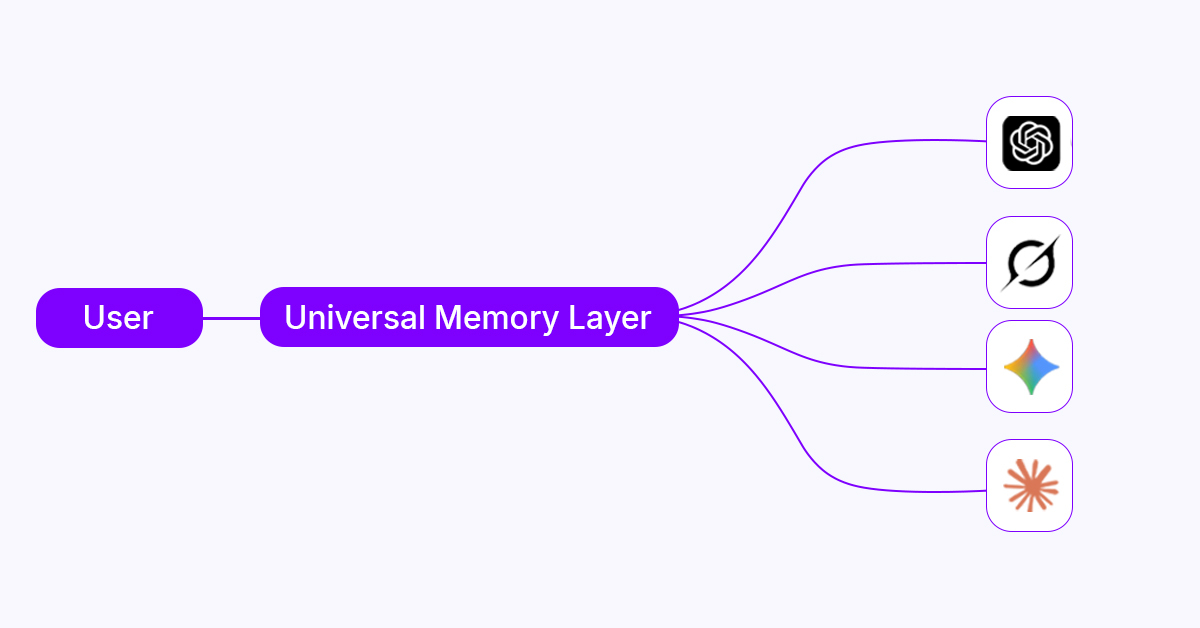
This approach directly solves the freelancer’s core problem: fragmented, platform-specific memory that cannot be transferred. When a client profile is created within a universal memory system, it contains everything the AI needs to operate accurately for that client. This includes brand identity and voice rules, project and strategic milestones, operational preferences, historical performance insights, and reusable creative assets. Over time, this memory of yours evolves as new work is completed and feedback is incorporated.
The critical advantage over native AI memory is portability. Client profiles are not tied to any single chat agent. When you switch from ChatGPT to Claude, or from Claude to Gemini, your project memory does not reset. The same client intelligence is applied instantly because not all platforms share the same universal memory layer.
For freelancers working across industries, this means context switching no longer impacts your productivity. The work remains consistent, informed, and continuous regardless of which AI tool or client you move between.
Take a look at the 5-minute setup guide and start experimenting with distinct memory buckets to enhance your productivity in your industry!
Create A Universal AI Memory System For All Your Clients
Implementing universal AI memory doesn’t require a complex technical setup or massive time investment. Most freelancers can establish a functional system within a few hours and see immediate productivity gains. The key is approaching the setup methodically, starting with your most active clients and expanding gradually with a universal memory platform, AI Context Flow – rated #1 on Product Hunt!
Quick Start Guide:
- Install AI Context Flow (Chrome Extension) – 2 minutes
- Create your first client bucket – 30 minutes
- Test with Pluto Agent (built-in testing tool) – 5 minutes
- Start using across all AI platforms – Immediate
How To Build Your First Client Profile (Memory Bucket)
Creating an effective client profile requires thoughtful documentation, but shouldn’t take more than 30-45 minutes per client. Focus on information that genuinely affects AI output quality rather than exhaustive detail that won’t be used.
Essential information to include:
- Brand voice characteristics, including tone, style, and personality, are supported by three to five examples of approved content that clearly demonstrate how the brand should sound.
- Strategic context covering what the client does, who they serve, how they differentiate from competitors, and the key messages that must remain consistent across all content.
- Operational preferences that influence deliverables, such as preferred content length, formatting choices, paragraph structure, use or avoidance of bullet points, and accepted or restricted industry terminology.
- Performance insights drawn from past work, including what content performed well, what did not, and recurring patterns in client feedback that should guide future output.
Universal AI Memory Is Not a Tool Upgrade, It Is a Workflow Correction For Freelancers!
Freelancers do not struggle because they manage multiple clients. They struggle because their tools force them to repeatedly rebuild knowledge that already exists. When context resets with every session or platform switch, productivity degrades by design. Universal AI memory corrects this flaw by making client intelligence persistent rather than disposable.
AI Context Flow enables this shift by acting as an external, cross-platform memory layer that works where freelancers already operate. Instead of adapting workflows to fragmented tools, freelancers regain control over context, continuity, and scale. The result is not just faster output, but more consistent, sustainable, and strategically aligned freelance work.
Take control of your workflows today with smarter context management.
Frequently Asked Questions (FAQ)
How long does it take to set up universal AI memory for my freelance clients?
Initial setup takes 30–45 minutes per client. Most freelancers configure 3–5 clients in a few hours and recover that time within the first week through reduced context rebuilding.
Will universal AI memory work with the AI tools I already use?
Yes. AI Context Flow is a Chrome extension that integrates with ChatGPT, Claude, Gemini, Perplexity, and Grok without changing how you use those tools.
How do I prevent mixing up client briefs?
Each client has an isolated profile. You activate one memory bucket at a time, ensuring client-specific tone, briefs, and preferences never leak into other projects.
Is my client's information secure in AI Context Flow?
Yes. We use strong encryption and controlled access. Your data remains private and is often safer than scattered notes across docs, chats, and emails.
Can I share client memory with team members and subcontractors?
Not right now, but we are building the team collaboration module to allow controlled sharing of project memory with collaborators and teams. Stay tuned.
How detailed should my client memory profiles be?
Keep them focused. Include voice rules, key preferences, positioning, and a few approved examples. One to two pages is usually sufficient at first, and you can keep refining them.
Does universal memory replace my project management tools?
No. It handles AI context and continuity, while project management tools handle deadlines, tasks, and workflows. They serve different roles.
How quickly will I see productivity improvements?
AI Context Flow is among the best productivity tools for freelancers, and most of you will notice improvements immediately. Within a week, many recover 8–12 hours previously lost to telling AI what to do and multiple revision cycles.
Can I use AI Context Flow if I only have two or three clients?
Yes. Even a small client load creates context-switching overhead. Universal memory improves consistency and efficiency regardless of client count.