



- Quick Answer (TL;DR)
- Understanding the Building Blocks: Context Windows
- What is AI Context?
- What is AI Memory?
- Agent Memory Types
- The Critical Difference: AI Memory vs AI Context
- The Perfect Blend: Universal AI Memory
- The Future of AI Memory and Context
- AI Memory + AI Context = 10x Productivity
- Frequently Asked Questions
AI Memory vs AI Context: What's the Difference?
By Hira • Dec 12, 2025
AI memory and AI context are two fundamental but distinct concepts in artificial intelligence systems. AI context is temporary working memory available during a current session, while AI memory is persistent storage that retains information across multiple sessions and conversations.
The key distinction: Context expires when you close your chat session. Memory persists indefinitely across all conversations. Understanding this difference is critical for professionals who waste an average of 5+ hours per week re-explaining the same information to AI tools.
If you’ve ever felt frustrated explaining the exact project details to ChatGPT for the third time this week, or watched Claude forget everything you discussed yesterday, you’re experiencing firsthand the limitations of AI systems. But what exactly is AI context? And how is it different from LLM memory? This comprehensive guide explains the technical differences, practical applications, and optimization strategies for both concepts.
Quick Answer (TL;DR)
What is AI Context?
AI Context is what the AI knows right now in the current session. It’s temporary working memory that expires when you close the chat.
What is AI Memory?
AI Memory = How does AI remember? It is what the AI can recall from previous sessions. It’s persistent information stored across conversations and platforms.
Key Differences:
- Duration: Context is temporary; Memory is permanent
- Scope: Context is session-specific; Memory spans all sessions
- Storage: Context uses the model’s window; Memory uses external databases
Tools like AI Context Flow combine these two concepts to create a universal memory layer that remembers your and your project’s details not only across sessions but across platforms, saving you 5+ hours per week and dramatically improving AI output quality through context-dependent memory.
Let’s break down what these terms really mean, why they matter, and how understanding them can transform your AI workflows from frustrating to effortless.
Understanding the Building Blocks: Context Windows
Before we dissect memory and context, we need to understand the foundation: context windows.
A context window is essentially the working memory of an AI model, i.e., the amount of information it can actively process and “remember” during a single interaction. Think of it like your brain’s ability to hold a phone number in your head just long enough to dial it.
Context windows are measured in tokens (roughly 0.75 words each), and different AI models have vastly different capacities. For example:
Context Window Comparison Across Major AI Models (2025)
| AI Model | Context Window | Approximate Words | Equivalent Pages | Best Use Case |
|---|---|---|---|---|
| GPT-4o | 128,000 tokens | ~96,000 words | 192 pages | General conversation, analysis |
| GPT-4o mini | 128,000 tokens | ~96,000 words | 192 pages | Fast, cost-effective tasks |
| Claude 3.5 Sonnet | 200,000 tokens | ~150,000 words | 300 pages | Long document analysis |
| Gemini 1.5 Pro | 2,000,000 tokens | ~1,500,000 words | 3,000 pages | Massive document processing |
| Perplexity Pro | 127,000 tokens | ~95,000 words | 190 pages | Research and citations |
| Grok | 128,000 tokens | ~96,000 words | 192 pages | Real-time information |
Source: Official model documentation as of December 2025
Critical Insight: Even with massive context windows, the model must use that space to track both your input prompts and its generated responses. This means the actual usable space for your information is typically 40-60% less than advertised.
Why Context Windows Matter
Larger context windows allow AI models to handle more complex prompts, analyze longer texts, perform multi-step tasks, and provide more nuanced answers. However, they’re not a perfect solution.
Research shows that larger, smarter models often have worse memory performance because they provide information you didn’t ask for, filling the context window faster, even when that window is bigger. This creates what researchers call the “lost in the middle problem“, where models can gloss over important details buried in large amounts of text.
Critical Insight: More context does not always mean better responses. The trick is to provide targeted, useful information regarding your current query rather than large amounts of irrelevant data to avoid problems like “context rot” or “lost in the middle”.
What is AI Context?
AI context refers to the information actively available to an AI model during a conversation or task. This includes:
- Your current prompt (what you just typed)
- The conversation history within the current session
- System instructions (how the AI has been programmed to behave)
- Any additional information loaded into the context window
Context is temporary and session-specific. It operates well inside a tight conversational window but lacks dependable persistence across time, devices, or ecosystems. Once you close your chat or start a new conversation, that context vanishes unless the AI has some form of memory system.
The Limitations of Context-Only Systems
Working purely with context creates several frustrating problems:
Session Dependency: Everything you tell the AI exists only for that single conversation. Start a new chat, and you’re back to square one.
Context Window Overflow: Long conversations can exceed the model’s context window, causing it to forget earlier parts of your discussion.
Platform Lock-In: Your context in ChatGPT doesn’t transfer to Claude, Gemini, or any other AI tool. You have to rebuild everything from scratch with each platform.
Token Waste: Repeatedly adding the same background information consumes tokens, increases costs, and slows down response times.
What is AI Memory?
AI memory refers to an AI system’s ability to store and recall information across multiple sessions and conversations. It’s the difference between a chatbot that remembers you’re a software developer working on a React project versus one that treats you like a complete stranger every time you log in.
AI researchers categorize memory into several types, borrowing from cognitive science:
The 5 Types of AI Memory: Complete Breakdown
| Memory Type | Duration | Capacity | Primary Function | Example Use Case | Implementation |
|---|---|---|---|---|---|
| Short-Term Memory | Seconds to minutes | 5–9 information chunks | Maintains current conversation | Remembering the last 3–5 exchanges in a chat | Context window |
| Long-Term Memory | Days to years | Virtually unlimited | Stores persistent information | Remembering user preferences across sessions | External databases, vector stores |
| Episodic Memory | Permanent | High capacity | Recalls specific events | “You asked about React performance last Tuesday” | Event logging, RAG systems |
| Semantic Memory | Permanent | High capacity | Stores factual knowledge | “User always prefers Python over JavaScript” | Knowledge graphs, embeddings |
| Procedural Memory | Permanent | Medium capacity | Remembers processes / workflows | “User always checks budget before suggesting solutions” | Rule-based systems, fine-tuning |
Source: IBM AI Agent Memory Research, LangChain Memory Documentation (2024-2025)
Agent Memory Types
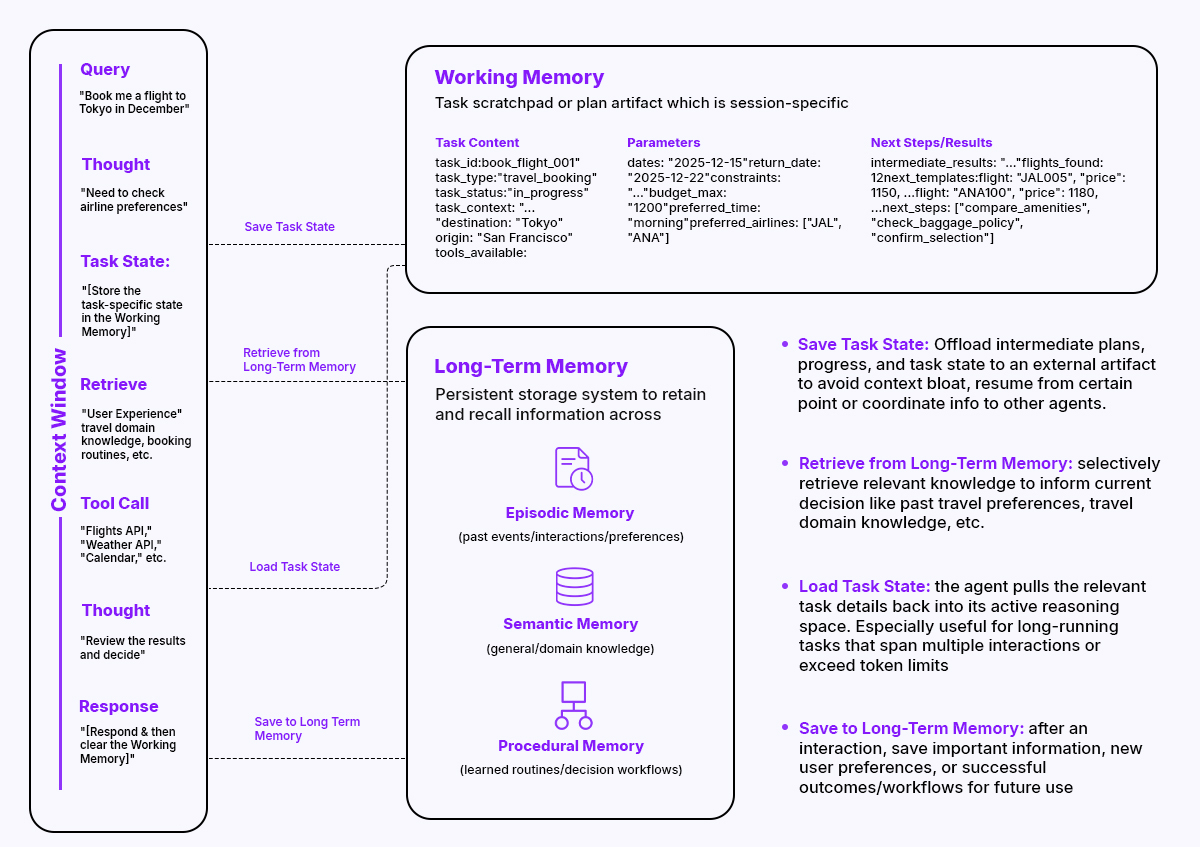
Diagram showing the 5 types of AI memory architecture
1. Short-Term Memory (Working Memory)
Short-term memory in AI retains information for a brief period, typically seconds to minutes, with a capacity similar to humans’ “magic number seven” constraint. This is essentially what happens within a single conversation: the AI keeps track of what you’ve discussed so far.
Key Characteristics:
- Duration: Seconds to minutes within a session
- Capacity: Limited by context window size
- Functionality: Maintains coherence in ongoing conversations
- Limitation: Expires when the session ends
2. Long-Term Memory (Persistent Memory)
Long-term memory enables AI agents to store and recall information across sessions, making them more personalized and intelligent over time. This is often implemented using databases, knowledge graphs, or vector embeddings.
Key Characteristics:
- Duration: Days, weeks, or indefinitely
- Capacity: Potentially unlimited with external storage
- Functionality: Enables personalization and learning across sessions
- Implementation: Requires external databases or storage systems
3. Episodic Memory
Episodic memory allows AI agents to recall specific past experiences, similar to how humans remember individual events, implemented by logging key events, actions, and their outcomes in a structured format.
Use Case Example: An AI financial advisor remembers your past investment choices and uses that history to provide better recommendations.
4. Semantic Memory
Semantic memory stores structured factual knowledge that an AI agent can retrieve and use for reasoning, containing generalized information such as facts, definitions, and rules.
Use Case Example: An AI knowing that you always prefer Python over JavaScript, or that your company uses AWS instead of Azure.
5. Procedural Memory
Procedural memory stores learned skills, procedures, and how-to knowledge, forming the AI’s repertoire of actions.
Use Case Example: An AI learning the optimal process for your specific workflow, like constantly checking budget constraints before suggesting solutions.
The Critical Difference: AI Memory vs AI Context
Here’s the fundamental distinction:
Context = What the AI knows right now in this conversation Memory = What the AI can recall from previous conversations
Think of it this way:
- Context is like taking notes during a meeting
- Memory is like having access to all previous meeting notes whenever you need them
Context vs Memory: Side-by-Side Comparison
| Feature | AI Context | AI Memory |
|---|---|---|
| Definition | Information available in the current session | Information stored across multiple sessions |
| Duration | Temporary (ends when session closes) | Persistent (lasts indefinitely) |
| Scope | Single conversation thread | Cross-session |
| Storage Location | Model’s context window | External databases or storage |
| Capacity | Limited by token count | Virtually unlimited |
| Portability | Session-specific | Can be universal or platform-locked |
| User Control | Low (managed by AI) | High (user can edit/delete) |
| Cost Impact | Consumes tokens each use | One-time storage cost |
| Update Frequency | Every message | Periodic or manual |
| Loss Risk | High (cleared on exit) | Low (persistent storage) |
A Practical Example
Without Memory (Context From Current Session Only):
Session 1:
You: “I’m building a React e-commerce app with Stripe payments,
targeting mobile users, with a $50k budget…”
AI: [Provides specific advice]
Session 2 (Next Day):
You: “How should I implement the cart functionality?”
AI: “I’d be happy to help! Could you tell me more about
your tech stack, budget, and requirements?”
With Memory:
Session 1:
You: “I’m building a React e-commerce app with Stripe payments…”
AI: [Provides specific advice and remembers the details]
Session 2 (Next Day):
You: “How should I implement the cart functionality?”
AI: “Based on your React + Stripe setup with the $50k budget
we discussed, here’s how to implement the cart…”
The difference is night and day in terms of productivity.
Want to use a cross-session, cross-platform memory that works anywhere? Try AI Context Flow
The Platform Lock-In Problem
Here’s where things get even more complicated: most AI platforms that offer “memory” features create what’s known as platform lock-in.
Memory has become AI companies’ primary retention tool, creating platform lock-in similar to early social media; if you built a follower graph on one network, moving to another platform felt like starting over.
This means:
- Your ChatGPT “memory” doesn’t work in Claude
- Your Claude “artifacts” don’t transfer to Gemini
- Your Gemini conversation history is useless in Perplexity
You’re essentially building separate relationships with each AI platform, and switching agents can feel like losing all the personalization you’ve carefully built up, a.k.a. the classic cold-start problem.
When You Need Context vs When You Need Memory
Understanding when to rely on context and when to use memory can dramatically improve your AI workflow.
Use Context When:
1. One-Time Tasks
- Quick questions with self-contained information
- Single document analysis
- Immediate problem-solving that won’t recur
2. Sensitive Information
- Data you don’t want stored long-term
- Confidential business details
- Personal information requiring session-only access
3. Experimental Work
- Testing different approaches
- Exploring ideas without commitment
- Situations where you don’t want the AI to “learn” from this interaction
Use Memory When:
1. Ongoing Projects
- Software development with consistent tech stacks
- Content creation with established brand voice
- Research projects spanning multiple sessions
2. Recurring Workflows
- Client management with multiple ongoing relationships
- Regular reporting with consistent formats
- Daily tasks with standard procedures
3. Personalization Needs
- Writing in your specific style
- Recommendations based on past preferences
- Maintaining context about your role, industry, or goals
4. Multi-Platform Work
- Using different AI tools for different strengths
- Switching between ChatGPT, Claude, and others based on the task
- Maintaining consistency across various AI assistants
The Perfect Blend: Universal AI Memory
The future of AI interaction isn’t about choosing between context and memory; it’s about having both work seamlessly together across all platforms.
Universal memory systems enable one memory across all your AI agents, eliminating platform lock-in and enabling best-of-breed tool selection while keeping context and personalization user-controlled.
| Feature | Platform-Specific Memory | Universal Memory (AI Context Flow) |
|---|---|---|
| Cross-Platform Access | ❌ No | ✅ Yes (ChatGPT, Claude, Gemini, Perplexity, Grok, and more) |
| Data Portability | ❌ Locked to one platform | ✅ Fully portable |
| Setup Time | 10–15 min per platform | 5 min one-time setup |
| Context Consistency | Inconsistent across tools | 100% consistent |
| User Control | Limited | Complete control |
| Privacy | Platform-dependent | User-controlled encryption |
| Platform Switching | Start from scratch | Seamless transition |
| Cost | Multiple subscriptions | Single solution |
| Update Sync | Manual updates needed | One-click synchronization |
| Memory Profiles | Single profile per platform | Multiple organized profiles |
How AI Context Flow Addresses These Pain Points
AI Context Flow is a browser extension that creates a universal memory layer across all major AI platforms. Instead of rebuilding your context for each AI tool, you:
- Save context once – Your project details, preferences, and knowledge
- Use anywhere – Automatically available in ChatGPT, Claude, Gemini, Perplexity, Grok, and more
- Stay in control – You decide what’s remembered and what’s forgotten
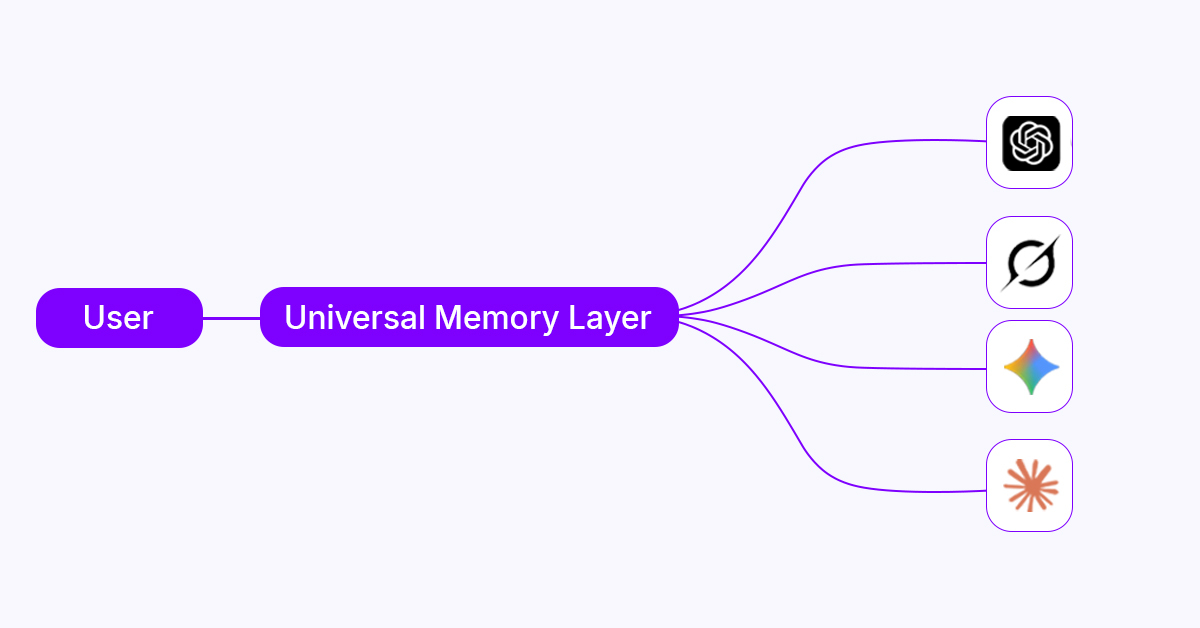
Diagram showing a universal memory layer like AI Context Flow working across all major AI platforms
This approach combines the best of both worlds:
- Context remains flexible and session-appropriate
- Memory provides consistency and eliminates repetition
- Portability prevents platform lock-in
Real-World Impact
Before AI Context Flow:
- 10+ minutes per chat session explaining the background
- Repeating the same information across different AI platforms
- Inconsistent results because context gets lost or abbreviated
- Wasted tokens and higher subscription costs
After AI Context Flow:
- Instant context loading in any AI tool
- Consistent, personalized responses across all platforms
- Freedom to use the best AI for each specific task
- Dramatic reduction in setup time and repetitive prompts
Save 5+ hours per week that would otherwise be spent on context repetition. Check this 5-minute guide to get started
Best Practices for Managing Your Universal AI Memory
Whether you’re using platform-specific or context-dependent memory features or a universal solution like AI Context Flow, here are key strategies:
1. Organize Your Memory Strategically
Keep different contexts for different areas of your life, e.g., work, personal, and creative contexts. This gives you complete control over what you share and where it goes.
Example Structure:
- Work Context: Tech stack, current projects, team structure
- Client Contexts: Individual profiles for each client
- Personal Context: Writing style, preferences, learning goals
- Creative Context: Artistic influences, style preferences
2. Keep Context Fresh and Relevant
Memory shouldn’t be a dumping ground. Regularly review and update:
- Remove outdated project information
- Update preferences as they evolve
- Archive completed projects
- Prune irrelevant details
3. Balance Specificity and Flexibility
Your stored context should be:
- Specific enough to save time (tech stack, constraints, preferences)
- Flexible enough to allow for new approaches and creativity
4. Test and Iterate
Monitor how well your context and memory setup works:
- Are responses consistently accurate?
- Do you still need to repeat information?
- Is the AI understanding your preferences?
- Are there gaps in what’s being remembered?
The Future of AI Memory and Context
The evolution of AI memory is moving in a clear direction: from nonexistent to platform-specific to universal and user-controlled.
The transition from platform-specific to universal AI memory has already begun, with early adopters experimenting with tools that provide cross-platform context management.
What's Coming Next
Improved Memory Retrieval: More sophisticated systems for determining what information is relevant when
Multi-Modal Memory: Not just text, but images, code, documents, and other formats
Collaborative Memory: Shared context across teams while maintaining privacy
Contextual Intelligence: AI that better understands when to use which memories, similar to how human memories and the brain work
Decentralized Storage: User-owned memory that isn’t controlled by any single company
Get Started With Universal AI Memory today. No silos, no platform lock-in → Try it here
AI Memory + AI Context = 10x Productivity
The distinction between AI memory and context isn’t just academic; it directly affects your daily productivity with AI tools.
Context brings in the immediate information required for each conversation. Memory ensures continuity, personalization, and efficiency across sessions and platforms.
The problem most users face isn’t a lack of either one; it’s the fragmentation of memory across different AI platforms. When you have to rebuild your context for ChatGPT, then again for Claude, and once more for Gemini, you’re wasting hours every week.
Universal memory systems address the continuity gap, where models perform well within conversations but lack reliable persistence across time, devices, or ecosystems.
By understanding these concepts and implementing a universal memory solution, you can:
- Save 5+ hours per week on context repetition
- Get more accurate, personalized results from all AI platforms
- Maintain consistency across different AI tools
- Eliminate the frustration of explaining yourself repeatedly
The future of AI interaction is here, and it remembers you.
Ready to stop repeating yourself? Try AI Context Flow free and experience universal AI memory across all your favorite AI platforms.
Frequently Asked Questions
Can AI remember everything I tell it?
It depends on the type of memory system. Context-only systems forget everything after each session. Platform-specific memory features are remembered within that platform. Universal memory solutions like AI Context Flow maintain your context across all platforms.
Is it safe to store my information in AI memory?
AI Context Flow prioritizes privacy with encryption, selective sharing, and retention policies, giving you complete control over what context is stored or shared.
How is universal memory different from just copying and pasting?
Universal memory is automatically available, properly formatted, and seamlessly integrated into your prompts. It saves time, reduces token usage, and provides consistency that manual copy-pasting cannot match.
Do I need different contexts for different AI platforms?
No. Universal memory systems work across all platforms simultaneously, eliminating the need to maintain separate contexts for each AI tool.
What happens if I switch AI platforms?
With platform-specific memory, you lose everything. With universal memory systems like AI Context Flow, your context travels with you, making platform-switching seamless.
Can AI remember past conversations with AI Context Flow?
Yes! You can save past conversations relevant to a context and reuse them later with our Chrome extension.